Understanding the Annual Information Statement (AIS) and Its Importance for Taxpayers
The income tax return (ITR) filing deadline on September 15 is drawing closer. Taxpayers are supposed to access necessary information through a multitude of documents, including Form-16, 26AS, and the Annual Information Statement (AIS). While 26AS includes information related to TDS (tax deducted at source) and TCS (tax collected at source), all other details pertaining to the taxpayer are reflected in the Annual Information Statement. However, taxpayers are recommended to examine the information given on AIS carefully and cross-verify it with other related documents.
What is AIS?
The Annual Information Statement provides complete information about a taxpayer for a particular financial year. It entails details about taxpayers’ incomes, financial transactions, and tax obligations, among others. AIS can be accessed by logging into an income tax e-filing account or through the mobile app “AIS for Taxpayer”.
Can There Be Errors in AIS?
There could be occasions where the information recorded in AIS is different from the actual figures. The Income Tax portal (incometaxindia.gov.in) states that in case the information given in AIS is wrong, duplicated, or pertains to someone else, taxpayers can share their feedback on it.
Real-Life Examples from Tax Professionals
Pratibha Goyal, a Delhi-based chartered accountant, highlights a few cases that she encountered while filing returns for her clients. There was a case, she told Livemint, wherein a mother-son duo sold a joint property for less than ₹50 lakh. “The buyer in that case had reported the transaction as a sale from the son only. So, TDS in the mother’s AIS was not shown. As a result, this had to be taken note of while filing the income tax return,” she said.
In another case, Goyal mentions, a sale of securities was reported twice.
What is the Way Out?
One of the most feasible ways to rectify mistakes is to cross-verify information with that on a related document. Goyal recommends that taxpayers reconcile the information with that on the related document. For instance, if it is related to interest received from a bank, then instead of relying on the AIS alone, the taxpayer can cross-check the information against the certificate issued by the bank. A taxpayer can access details related to AIS and submit their response (if needed) by logging into their income tax e-filing account, according to the information available on the I-T portal.
By taking these steps, taxpayers can ensure that their ITRs are filed accurately and avoid potential discrepancies with the AIS data.
The Annual Information Statement (AIS), initiated by the Income Tax Department to improve transparency, is unfortunately causing challenges for taxpayers by reporting inaccurate income figures, according to chartered accountants.
Launched in 2021, the AIS provides a comprehensive view of financial activities—from securities and mutual fund transactions to real estate purchases and fixed deposits—over a fiscal year, compiled from various reporting sources such as banks, registrars, depositories, and sub-registrars.
Accessible via the Income Tax e-Filing portal, the AIS complements Form 26AS by delivering an enriched perspective of different income sources and transactions that could have tax consequences.
A prevalent issue within the AIS involves capital market transactions, particularly in equity trading. While brokers and depositories provide trade information, there are often discrepancies between reported prices and actual trade values.
“We have encountered numerous significant mismatches in tax declarations that can pose serious issues for taxpayers. For example, in equity deals, depositories oftentimes report closing prices that differ slightly from the actual transaction prices,” stated Ashish Karundia, a chartered accountant and founder of Ashish Karundia & Co.
These inconsistencies often stem from systems that fail to capture real-time transaction prices or details specific to settlements.
“I have handled cases involving senior citizens who do not even possess a demat account, yet the AIS inaccurately recorded capital gains for them. These individuals have never engaged in any security transactions throughout their lives, but the system indicated otherwise,” remarked lawyer and chartered accountant Kinjal Bhuta, who is also a treasurer at the Bombay Chartered Accountants’ Society.
Property transactions represent another significant source of confusion in the AIS, particularly when it comes to joint ownership. The system frequently attributes the full property value to each co-owner, leading to inflated income reports.
“One reason for this issue is that real estate, fixed deposits, securities, or mutual fund shares might have been acquired in joint names purely for convenience or as a token gesture. However, the second (joint) owner might not have contributed financially to the purchase,” explained Pankaj Bhuta, chartered accountant and founder of P. R. Bhuta & Co.
Even gifting transactions suffer from reporting errors. “We encountered a curious case regarding property gifting. When a gift deed is executed and registered under stamp duty, the system incorrectly classifies it as a sale and purchase. As a result, both the giver and receiver receive notices based on the stamp duty value and fair market value, despite it being merely a gift,” Kinjal Bhuta noted.
This misunderstanding arises from how sub-registrars log transactions, pointed out Ganesh Rajgopalan, partner at A.P. Rajagopalan & Co.
“When joint property dealings are registered, sub-registrars duplicate the same transaction across each joint owner, creating a convoluted reporting landscape. Thus, a single property transaction can be recorded multiple times for different PAN (Permanent Account Number) holders, lacking clarity regarding the individual ownership stakes,” he stated.
For example, if an individual invests ₹5 lakh in a five-year fixed deposit with a 7% annual interest rate, an interest of about ₹35,000 accrues each year for a total of ₹1.75 lakh over five years. Ideally, this interest should be reported annually and taxed accordingly. However, if the bank only reports the total maturity value of ₹6.75 lakh (principal + interest) in the final year, the AIS may inaccurately attribute the entire ₹1.75 lakh interest as income in that year, inflating the reported income.
What Can Taxpayers Do?
If you identify discrepancies in your AIS, your first action should be to reconcile the data—comparing the AIS, Form 26AS, and Taxpayer Information Summary (TIS) with your own records.
Choose the financial year → View AIS → Select the transaction
Click ‘Optional’ under ‘Provide Feedback’ and submit your response.
Make sure to keep the acknowledgment (Reference ID) for future reference.
Karundia suggested that taxpayers should categorize the type of mismatch, prepare a reconciliation statement, and submit it via the AIS platform. “If the issue is not resolved through the AIS feedback channel, taxpayers might also consider reaching out directly to the reporting entities for corrections.
Recommendations for the Tax Department
The annual information statements currently lack legal grounding. “Taxpayers are permitted to contest these AIS entries since there is no legislation validating these reports. The department has established these procedures without a robust legislative underpinning,” noted Kinjal Bhuta.
Karundia suggested broadening feedback mechanisms on the AIS platform. “Introducing a process where taxpayers can communicate feedback directly to reporting entities would improve accountability and likely accelerate resolution times.”
“The existing process of addressing queries to sub-registrars is inherently flawed and complicates matters unnecessarily for taxpayers. The Income Tax Department should develop advanced software algorithms to automatically reconcile transaction values,” emphasized Rajgopalan.
Returns and Forms Applicable for Domestic Company for AY 2024-25: Domestic company: As per Section 2(22A), Domestic Company means an Indian Company, or any other Company which, in respect of its income liable to tax under this Act, has made the prescribed arrangements for the declaration and payment, within India, of the dividends (including dividends on preference shares) payable out of such income.
1. ITR-6
Applicable for Companies other than those claiming exemption u/s 11. Company includes:
Indian Company
Body corporate incorporated by or under the laws of country outside India
Any institution, association or body, whether incorporated or not and whether Indian or Non-Indian which is declared by general or special order of the Board, to be Company, etc.
Information (Advance tax/SAT, Details of refund, SFT Transaction, TDS u/s 194 IA,194 IB,194M,TDS defaults) which were available in 26AS will now be available in AIS mentioned below
Income Tax Department (It can be accessed after logging on to Income Tax e-Filing portal)Path to Access AIS: Go to e-filing portal>login>AIS
Tax Deducted / Collected at SourceSFT InformationPayment of taxesDemand / RefundOther information (Like; Pending/Completed proceedings, GST Information, Information received from foreign government etc)
Taxpayer requiring mandatory audit under any other law and who is required to get their accounts audited by an Accountant u/s 44AB. To be furnished one month before the due date for furnishing the return of income under sub-section (1) of section 139.
Taxpayer who enters into an international transaction or specified domestic transaction is required to obtain a report from a chartered accountant u/s 92E. To be furnished one month before the due date for furnishing the return of income under sub-section (1) of section 139.
Report from a chartered accountant containing details of all international transaction(s) or specified domestic transaction(s)
5. Form 16A – Certificate u/s 203 of the Income Tax Act, 1961 for TDS on Income other than Salary
Provided by
Details provided in the form
Deductor to Deductee
Form 16A is a certificate of Tax Deducted at Source (TDS) issued quarterly that captures the amount of TDS, Nature of Payments and the TDS payments deposited with the Income Tax Department.
Taxpayer who is required to obtain a report from an Accountant u/s 115JB of the Income Tax Act,1961. To be furnished one month before the due date for furnishing the return of income under sub-section (1) of section 139.
Report in a case of Company to which Section 115JB applies certifying that the book profit has been computed in accordance with the provisions of Section 115JB
7. Form 67- Statement of Income from a Country or Specified Territory outside India and Foreign Tax Credit
Submitted by
Details provided in the form
Taxpayer on or before the due date specified for furnishing ITRs under section139(1)
Income from a country or specified territory outside India and foreign tax credit claimed
Form 10-ID needs to be filed by New Manufacturing Domestic Companies incorporated after 1st October 2019 who are willing to opt for the special tax rate of 15 % u/s 115BAB
10. Form 10-CCB
Submitted by
Details provided in the form
Taxpayer who is required to obtain a report from an Accountant to claim the deductions u/s 80-I(7) / 80- IA / 80-IB / 80-IC / 80-IE of the Income Tax Act, 1961.
Taxpayer who is required to obtain a report from an Accountant to claim the deductions u/s 80-IB (11B) of the Income Tax Act,1961
Audit Report in Form 10-CCBC is a mandatory requirement to claim deduction u/s 80-IB(11B). It is to be filed one month before the due date for filing ITR u/s 139(1).
Total Turnover or Gross Receipts during the previous year 2020-21 does not exceed ₹ 400 crores
25%
If opted for Section 115BA
25%
If opted for Section 115BAA
22%
If opted for Section 115BAB
15%
Any other Domestic Company
30%
Surcharge, Marginal Relief and Health & Education Cess
What is Surcharge?
Surcharge is an additional charge levied for persons earning income above the specified limits, it is charged on the amount of income tax calculated as per applicable rates 7% – Taxable income above ₹ 1 crore– Up to ₹ 10 crore 12% – Taxable income above ₹ 10 crore 10% – If Company opting for taxability u/s 115BAA or Section 115BAB
Health and Education cess @ 4% shall also be paid on the amount of income tax plus surcharge (if any).
Note:
A Company shall be liable to pay Minimum Alternate Tax (MAT) at 15% of book profit (plus surcharge and Health and Education cess as applicable) where the normal tax liability of the Company is less than 15% of book profit.
A Company, being a unit of an International Financial Services Centre and deriving its income solely in convertible foreign exchange, MAT shall be payable at 9% (plus cess and surcharge as applicable)
The Companies opting for special rate of taxation u/s 115BAA or 115BAB will not be allowed certain deductions like section 80IA, 80IAB, 80IAC, 80IB and so on, except deduction u/s 80JJAA and 80M.
National Urban Poverty Eradication Fund as set up and notified by Central Government
Note: No deduction shall be allowed under this section in respect of donation made in cash exceeding ₹ 2000 or if gross total income includes income from Profit / Gains from Business / Profession.
Section 80GGB
Sum contributed to Political Party or Electoral Trust is allowed as deduction (subject to certain conditions)
Undertaking engaged in Developing, Maintaining and Operating any Infrastructure Facility (only Indian Company), Industrial Parks (any Undertaking), any Power Undertaking, Reconstruction or Revival of Power Generating Plants (Indian Company) shall be entitled to claim deduction(subject to certain conditions)
100% of profit for 10 consecutive AYs falling within a period of 15 AYs beginning with the AY in which Assessee develops / begins operating and maintaining infrastructure facility
Deduction in respect of Profits and Gains by an Undertaking or an Enterprise engaged in development of Special Economic Zone(subject to certain conditions)
No deduction to an Assessee, where the development of Special Economic Zone begins on or after 1st April 2017
Section 80IAC
Profit and Gains derived by an Eligible Start-up from Specified Business
100% of profit for 3 consecutive assessment years out of 10 years beginning from the year in which the eligible Start-up is incorporated
Section 80IB
Deduction towards Profits and Gains from specified industrial undertakings other than infrastructure development undertakings- 100% of profit for 10 years from the AY in which it is approved by prescribed authority (if approved after 31st March 2000 but before 1st April 2007)
Processing, Preservation and Packaging of Fruits or Vegetables, Meat and Meat Products or Poultry or Marine or Dairy Products; Integrated Business of Handling, Storage and Transportation of Food Grains
(Subject to certain conditions)
100% / 25% of profit for 5 / 10 / 7 years as per conditions specified for different types of undertakings
Where the Gross Total Income of Domestic Company in any previous year includes any income by way of dividends from any other Domestic Company or Foreign Company or a Business Trust ,there shall, in accordance with and subject to provisions of this section, be allowed in computing the Total Income of such Domestic Company, a deduction of an amount equal to so much of the amount of income by way of dividend received from another Domestic Company as does not exceed the amount of dividend distributed to shareholder one month prior to the due date of filing of return
80PA
Producer company engaged in an Eligible Business of Marketing, Purchase or Processing of Agricultural Produce of its Members
100% of profits for a period of 5 years from the AY 2019-20 subject to the condition that the total turnover of Company shall be less than ₹ 100 crores during the FY
The CBDT has released a Handbook on the Annual Information Statement (AIS) detailing 57 types of income and expenses to be reported on the Income Tax Portal. This encompasses various financial transactions such as salary, rent received, dividends, interest income, as well as business expenses and cash transactions. Accurate reporting is crucial for compliance and to assist tax authorities in tax assessment and refunds.
The Income Tax Department has introduced new features in its Annual Information Statement (AIS) on the IT portal with the aim of enhancing transparency and convenience for taxpayers. The updated AIS provides a comprehensive overview of the data reported by taxpayers, including details on Tax Deducted at Source (TDS), Tax Collected at Source (TCS), and other relevant information.
One key feature of the AIS rollout is that it enables taxpayers to track the status of the information confirmation process. Additionally, individuals who have overpaid taxes can easily claim a refund by accessing the AIS portal while filing their Income Tax Return (ITR). This online platform streamlines the process by handling prepaid taxes, with taxpayers only needing to verify the details before submitting their ITR. The implementation of this new method is expected to reduce refund processing times by eliminating manual intervention.
Furthermore, the AIS will display a taxpayer’s income from various sources such as salary, interest, dividends, as well as capital gains from mutual funds and stocks. Alongside this, it will streamline the refund process and serve as a comprehensive source of data on taxes paid through TDS and TCS, including the names of the deductor or collector who reported the information. By showcasing a taxpayer’s income and taxes, the AIS aims to promote voluntary compliance and transparency.
The Income Tax Department has urged all taxpayers to log in to the AIS and review the information that will be reported in their ITR before filing. This proactive approach is designed to address issues related to low data quality, thus minimizing the need for subsequent data rectification. In summary, the enhancements to the AIS represent a positive stride towards empowering taxpayers and simplifying the tax filing process.
The Central Board of Direct Taxes stated, “This new functionality is expected to increase transparency by displaying such information in AIS to the taxpayer. This is another initiative of the Income Tax Department towards ease of compliance and enhanced taxpayer services.
The deadline for filing the Income Tax Return (ITR) is quickly approaching, increasing the risk of making mistakes due to rushing through important income details. With each passing day, tax experts advise against last-minute delays or issues to avoid potential challenges, such as discrepancies between the Annual Information Statement (AIS), Form 26AS, and Form 16.
Filing the ITR form often leads taxpayers to encounter variations in the information presented in the AIS, Form 26AS, and Form 16, which can lead to unnecessary delays. These discrepancies may arise from filing errors, delayed or incorrect reporting by employers, or dealing with multiple deductions.
Mismatched details in Form 16 or Form 26AS, especially with the Permanent Account Number (PAN) or Tax Deduction and Collection Account Number (TAN), can cause setbacks. Additionally, missing tax deducted at source (TDS) entries in Form 26AS and the AIS may result from employers’ failure to report these details to the tax department or delays in updating the information.
It is crucial to ensure timely reconciliation of TDS details and to provide accurate information in the ITR to facilitate a smooth income tax filing process, reducing the likelihood of receiving notices or facing scrutiny from the Income Tax Department.
When discrepancies between TDS and other information in Form 16, Form 26AS, and the AIS arise, it is advisable to take the following necessary steps:
Cross-check the details: Carefully compare TDS details across all three documents, focusing on any variations causing the mismatch.
Contact the tax officials: Reach out to the income tax department to inform them about discrepancies in Form 26AS and the AIS. Seek guidance on necessary steps to rectify the issue and ensure accurate reporting of TDS.
File a complaint: If the employer(s) or the income tax department does not address your grievances, consider filing a complaint through the department’s e-filing portal or by submitting a written complaint, providing relevant details and supporting documents.
Most discrepancies occur at the base level, emphasizing the importance of verifying details of various forms and TDS before filing the ITR within the stipulated period. Taxpayers must take specific steps to avoid mistakes and subsequent penalties while filing their ITRs on time.
Key actions to take include:
Verifying details in Form 26AS before filing the ITR, addressing any discrepancies with the employer(s) and tax department promptly.
Ensuring the timely filing of the ITR after confirming TDS details in Form 26AS and Form 16 to prevent penalties and comply with tax regulations.
Swiftly addressing any inconsistencies is essential to accurately report TDS and avoid potential issues during income tax assessments or refund procedures. Despite measures to reduce mismatches between Form 16 and Form 26AS, maintaining thorough documentation and records is essential.
Many taxpayers are facing challenges with their advance tax payments due to inaccuracies in their Annual Information Statements (AIS). The Central Board of Direct Taxes (CBDT) has recognized this issue and advised taxpayers to await updated data on the ‘AIS Compliance Portal‘, especially concerning financial data related to stock market and mutual fund transactions.
The CBDT has stated on the AIS Compliance Portal website that data related to categories such as the sale and purchase of securities and units of mutual funds, as well as off-market credit and debit transactions, is being updated. With the fourth instalment of advance tax for individuals due on March 15, 2024 for FY 2023-24, individuals may be concerned about potential penalties arising from any discrepancies. However, experts reassure taxpayers that there is no need to worry about paying advance tax based on incorrect AIS transaction values.
It is emphasized that taxpayers should pay their advance tax liability based on their own evidence and data, irrespective of any discrepancies on the AIS Compliance Portal. There is hope that the data inconsistencies will be resolved before the income tax return (ITR) filing dates.
Furthermore, experts clarify that no penal interest will be charged for non-payment of advance tax due to incorrect AIS transactions. Taxpayers are advised to pay advance tax based on their own calculations, as there is no provision for levying interest on shortfalls in advance tax payment resulting from incorrect data on the AIS Compliance Portal. It’s important for taxpayers to exercise caution and not overpay their advance tax liability to avoid unnecessary financial strain.
The severity of the glitch affecting taxpayers’ data is evident in cases where AIS shows significantly inflated transaction values for the sale of shares, mutual funds, and property compared to the actual values. Such discrepancies can amount to a substantial sum, as observed in real-life cases. Taxpayers are strongly cautioned against relying solely on AIS for advance tax computation, given its potential inaccuracy due to these errors.
In the event that the error is not resolved automatically, the Income Tax Department advises taxpayers to calculate advance tax using their own data. Additionally, while AIS and Form 26AS can help reconcile income and TDS, primary sources of information such as bank statements, demat statements, and interest certificates should be the primary reference points. If discrepancies persist, taxpayers are encouraged to provide feedback to the Income Tax Department through the AIS Compliance Portal to notify them about the observed discrepancies.
The Income Tax Department Monday said it is in the process of issuing notice to taxpayers about ‘mismatch’ between the information filed in the Income Tax Return (ITR) vis-a-vis information of specified financial transactions, as available with the department, for the assessment year 2021-22 (FY 2020-21).
The tax department urged taxpayers to access their Annual Information Statement (AIS) through the e-filing portal of the department’s website and review the AIS. If any discrepancies, mismatches or missing information is flagged, update the ITRs (ITR-U). So, what is this Annual Information Statement? How can it be accessed and how to correct the errors in AIS?
What is an Annual Information Statement?
The Annual Information Statement—introduced in November 2021— gives taxpayers a single comprehensive statement on all their financial transactions done in a financial year. The statement is available in the income tax portal and includes financial transactions reported by banks, RTOs, stock exchanges, etc, with the Income Tax Department.
Annual Information Statement is divided into two parts: Part A (General Information of the taxpayer) and Part B (TDS/TCS Information)
Part A: This part of AIS contains the taxpayer’s general information, including his name, PAN, masked Aadhaar number, date of birth, mobile number, e-mail ID, address, etc.
Part B: This part of AIS contains the taxpayer’s financial transaction information, including tax deducted at source (TDS), tax collected at source (TCS), specified financial transactions (SFTs), payment of taxes, demand and refund, gains from other sources like lottery, crossword puzzle or horse race etc, receipt of accumulated balance from provident fund (PF), interest from bonds, government securities, offshore fund, shares of Indian companies, insurance commission etc.
The key objective of an Annual Information Statement is to enable the seamless filing of income tax returns (ITR) for taxpayers, promote voluntary compliance and, most importantly, deter non-compliance.
How to access the Annual Information Statement?
To access the Annual Information Statement, the taxpayers should log in to the I-T e-filing website www.incometax.gov.in and follow the following steps:
How to correct errors in the Annual Information Statement
Taxpayers who feel that the information reflected in AIS for the given assessment year is not inaccurate can submit a corrected response. The statement can be evaluated for all entries, including personal information and financial transactions.
Select ‘Annual Information Statement (AIS)’ under the ‘Services tab’
A new window will pop up, giving two options: Taxpayer Information Summary (TIS) and Annual Information Statement (AIS)
Click on the AIS
A new window will pop up, and you will see Part A and Part B of the AIS
Now, select the information which is not correct
Select ‘Optional’ to submit your feedback
There will be seven options available to you. Select the option applicable from the drop-down menu
Now, click on Submit
As soon as taxpayers submit feedback, the status is updated in real time.
FAQs on AIS (Annual Information Statement)
Q-1 What is Annual Information Statement (AIS)?
Annual Information Statement (AIS) is comprehensive view of information for a taxpayer displayed in Form 26AS. Taxpayer can provide feedback on information displayed in AIS. AIS shows both reported value and modified value (i.e. value after considering taxpayer feedback) under each section (i.e. TDS, SFT, Other information).
The objectives of AIS are:
Displays complete information to the taxpayer with a facility to capture online feedback
Promotes voluntary compliance and enable seamless prefilling of return
Deters non-compliance
For more information, navigate to AIS under e-File/AIS menu after login.
Q-2 What is the difference between AIS and Form 26AS?
AIS is the extension of Form 26AS. Form 26AS displays details of property purchases, high-value investments, and TDS/TCS transactions carried out during the financial year. AIS additionally includes savings account interest, dividend, rent received, purchase and sale transactions of securities/immovable properties, foreign remittances, interest on deposits, GST turnover etc.
AIS also provides the taxpayer the option to give feedback on the transactions reported. Further, the aggregation of transactions on information source level is also reported in TIS.
For more information, navigate to AIS under e-File/AIS menu after login.
Q-3 How can I view the Annual Information Statement?
You can access the Annual Information Statement functionality by following below mentioned steps:
Step 4: Click on Proceed button which will redirect to AIS portal and click on AIS tile to view the Annual Information Statement.
Q-4 What are the components of Annual Information Statement (AIS)?
The information shown on AIS is divided in two parts:
PART A- General Information
Part A displays general information pertaining to you, including PAN, Masked Aadhar Number, Name of the Taxpayer, Date of Birth/ Incorporation/ Formation, mobile number, e-mail address and address of Taxpayer.
PART B – TDS/TCS Information
Information related to tax deducted/collected at source is displayed here. The Information code of the TDS/TCS, Information description and Information value is shown.
SFT Information: Under this head, information received from reporting entities under Statement of Financial transaction (SFT) is displayed. The SFT code, Information description and Information value is made available.
Payment of Taxes: Information relating to payment of taxes under different heads, such as Advance Tax and Self-Assessment Tax is shown.
Demand and Refund: You will be able to view the details of the demand raised and refund initiated (AY and amount) during a financial year. (Details related to Demand will be released soon).
Other Information: Details of the information received from the other sources, such as data pertaining to Annexure II salary, Interest on refund, Outward Foreign Remittance/Purchase of Foreign Currency etc. is displayed here.
For more information, navigate to AIS under e-File/AIS menu after login.
Q-5 What does General information part contain under AIS?
General information displays the general information pertaining to you, including PAN, Masked Aadhar Number, Name of the Taxpayer, Date of Birth/ Incorporation/ Formation, mobile number, e-mail address and address of Taxpayer.
For more information, navigate to AIS under e-File/AIS menu after login.
Q-6 Can I track the activity history in AIS?
Yes, you can track the activity history in AIS by clicking on the Activity History button on AIS homepage. You will be provided a summary view of activity performed on the AIS functionality. System generated ID (Activity ID) will be created for each performed activity, and the Activity date, Activity description and detail will be displayed under this tab.
For more information, navigate to AIS under e-File/AIS menu after login.
Q-7 What does Taxpayer Information Summary (TIS) contain under AIS?
Taxpayer Information Summary (TIS) is an information category wise aggregated information summary for a taxpayer. It shows processed value (i.e. value generated after deduplication of information based on pre-defined rules) and derived value (i.e. value derived after considering the taxpayer feedback and processed value) under each information category (e.g. Salary, Interest, Dividend etc.). The derived information in TIS will be used for pre-filling of return, if applicable.
You will be shown various details within the Taxpayer Information Summary such as,
Information Category
Processed Value
Derived Value
Further, within an Information Category, following information is shown:
Part through which information received
Information Description
Information Source
Amount Description
Amount (Reported, Processed, Derived)
For more information, navigate to AIS under e-File/AIS menu after login.
Q-8 In what all formats can I download my AIS?
You can download Annual Information Statement (AIS) in PDF, JSON, CSV file formats.
Q-9 How do I submit feedback on the information?
You can submit feedback on active information displayed under TDS/TCS Information, SFT Information or Other information by following below mentioned steps:
Step 1: Click on Optional button mentioned in the Feedback column for relevant information. You will be directed to Add Feedback screen.
Step 2: Choose the relevant feedback option and enter the feedback details (dependent on feedback option).
Step 3: Click Submit to submit the feedback
For more information, navigate to AIS under e-File/AIS menu after login.
Q-10 What will happen once I submit the feedback?
Upon successful submission of feedback on AIS information, the feedback will be displayed with the information and the modified value of the information will also be visible with the reported value. The activity history tab will also be updated, and you will be able to download Acknowledgement Receipt. Email and SMS confirmations for submission of feedback will also be sent.
For more information, navigate to AIS under e-File/AIS menu after login.
Q-11 Would I get any confirmation on submission of AIS feedback?
Yes, after successful submission of your feedback on AIS information, the activity history tab will be updated, and you will be able to download Acknowledgement Receipt of the same. Email and SMS confirmations for submission of feedback will also be sent.
Q-12 What is AIS Consolidated Feedback file?
AIS Consolidated Feedback file (ACF) gives the taxpayers a facility to view all their AIS feedback (other than feedback, ‘Information is correct’) related information in one pdf for easy understanding. After submitting the feedback of the AIS, you can download the AIS consolidated feedback file (PDF).
For more information, navigate to AIS under e-File/AIS menu after login.
Q-13 Is there any limit on the number of times I can modify a given feedback?
Currently, there is no limit on the number of times you can modify previously given feedbacks.
Q-14 Can I verify the GST turnover in AIS?
Yes, AIS does display the information related to GST turnover under information code (EXC-GSTR3B). The same would be visible in the Other Information tab in AIS.
Q-15 Is there any video tutorial available for AIS?
Yes, there is an informational video available on YouTube for AIS. This video can be accessed here.
Detailed step-by-step instructions for viewing and downloading Form 26AS via the Income Tax India e-Filing Portal, also through TRACES, and net banking. Also, it explains the importance of Form 26AS to have good tax compliance and file your returns correctly.
1. What is Form 26AS ?
Form26AS is an important tax document in India, that every tax payer need to refer at the time of Income Tax Filing, broadly contains the taxes that are paid on your PAN number.
Tax deducted at source on Salary, Interest Income or Other Income
Tax Collected at Source by the Seller
Advance Tax Paid / Self-Assessment tax during the Financial Year (W.e.f AY 2023-24, this information is not available in Form 26AS.Taxpayer needs to refer AIS for the challan details)
Refund received during the year and other related information (W.e.f AY 2023-24, this information is not available in Form 26AS.Taxpayer needs to refer AIS for the refund details. Only TDS refund will be available in Form 26AS)
Details of SFT (Statement of Financial Transactions) like Cash Deposits in Current Account, other than current account, Sale or Purchase of Immovable Property, Sale or Purchase of Mutual Funds, Payment of Credit Cards, Purchase of Foreign Exchange Currency etc (W.e.f AY 2023-24, this information is not available in Form 26AS.Taxpayer needs to refer AIS for the SFT details)
Details of TDS Defaults (for the TAN holders)
Details of GST Turnover as per GSTR 3B (for GST registered dealers)etc (W.e.f AY 2023-24, this information is not available in Form 26AS.Taxpayer needs to refer AIS for the GST details)
4. Instructions to download Form 26AS from Income Tax India e-Filing Portal
Enter the User Id (PAN / AADHAR / OTHER USER ID). Now click on login.
Step 3.
After login, the following screen will appear. Go to e-File and click Income Tax Return and click on View Form 26AS (Tax Credit) in the drop-down menu.
Step 4:
Click on confirm so that you will be re directed to TDS-CPC (Traces) website to view your form 26AS.
Step 5:
Now you are on the Traces Website (TDS-CPC). Select the box and proceed.
Step 6:
Click on the link View Tax credit (Form 26AS) at the bottom of the page to view form 26AS.
Step 7:
Select the Assessment year, format (HTML / text) in which you want to see your Form 26AS, and click on view /download.
If you want to see the form 26AS in online, select the format as HTML
If you want to download the 26AS in text format, select the format as ‘text’.
If you want to download the 26AS in pdf, select the format as View as HTML, Click on View/Download and Click on Export as pdf to download in pdf.
Step 8:
The password for opening your form 26AS is your date of birth (DOB) in ddmmyyyy format. For example, if your DOB is 01-Jul-1974, enter the password as 01071974)
5. Instructions to view Form 26AS through Internet Banking
A tax payer who has internet banking access with a bank authorised by the Income Tax Department to show tax credit can use this facility.
ITR mistakes: Five return-filing errors that could trigger income tax notices: The countdown to the due date for filing income tax returns for the financial year 2022-23 (assessment year 2023-24) has begun.
Now, that’s the first ‘don’t’ in the list of do’s and don’ts for filing income tax returns.
As Moneycontrol has pointed out earlier, some salaried tax-payers claim deductions – not part of the Forms-16 issued by their employers – while filing tax returns.
For instance, claiming the exemption for house rent allowance which is a part of pay packages even when they have not paid rent and are not eligible for the exemption under section 10.
Since no documentary evidence is to be attached while submitting I-T returns, some misuse this relaxation to secure tax refunds. However, this could result in I-T notices, as some salaried individuals realised recently. It’s best to be honest while filing your returns, instead of inviting trouble later.
YOUR GUIDE TO FILING INCOME TAX RETURN FOR FY 2022-23
Do’s
Don’ts
Chose the right ITR form
Do not wait until July 31 to file returns
Report all incomes, including savings account interest
Do not file without checking AIS and Form 26AS
Seek professional help for reporting capital gains, crypto assets and foregn income
Do not claim tax deductions you are not eligible for
Enter correct bank account details for timely tax refund
Do not delay verifying your return after online submission
Multiple income sources? D-I-Y approach has its limitations
Hyderabad-based chartered accountant Nagachandra Reddy, Founder, Somu & Associates says he has come across such cases while filing returns this year. “Many tax-payers simply go by videos and reels on social media platforms explaining how tax returns should be filed. Some end up making mistakes that, in fact, result in additional tax outgo,” he says, citing the example of a tax-payer who treated the gains made on sale of stocks after holding them for less than one year as business income.
If you have dabbled in shares and cryptocurrencies, sold mutual fund units, own foreign assets or unlisted shares, you need to tread carefully with your returns. Non-disclosure can lead to tax notices and penalties. If you find the process to be complex, seek the help of tax professionals to see you through.
For salaried employees, Form-16 is the key document while filing returns. However, certain incomes do not reflect in Form-16. For instance, even assuming that they do not draw income from other sources, their savings account balance would earn interest, which is subject to tax (though savings account interest up to Rs 10,000 is allowed as deduction under section 80TTA). Likewise, capital gains that you may have made on sale of shares or mutual fund units won’t show up in your Form-16.
As a result, some may miss reporting such income, exposing themselves to the likelihood of an I-T notice. However, you cannot afford to make such mistakes now that you can easily refer to Annual Information Statement (AIS), which contains details of all such sources of income. Ensure that you go through AIS as also your bank statements and capital gain statements issued by mutual fund intermediaries, broking houses and declare these incomes to avoid tax notices later.
“With the introduction of Annual Information Statement (AIS), there is no question of missing reporting any income. We have seen individuals who would have probably skipped mentioning these income details, approaching us to file their returns after checking their AIS,” says Chetan Chandak, Director, TaxBirbal, a tax consultancy portal.
Your sources of income will also determine the ITR form you ought to use. So, a salaried individual with income from capital gains will have to use form ITR-2 to file the returns, besides sharing details in the capital gains (CG) schedule. Similar would be the case with a salaried tax-payer with income of over Rs 50 lakh, including rental income, unlisted shares, foreign income and assets and crypto transactions.
The simpler form ITR-1 is for salaried tax-payers who own one house property, and earn interest income and agricultural income of less than Rs 5,000. Their total income should be less than Rs 50 lakh. Filing returns through a wrong ITR form will render the ITR form ‘defective.’ You could receive tax notices to file revised returns and failure to respond in time will result in your returns being treated as invalid.
Do not ignore the I-T return verification process
If you think your ITR filing task is done for the year once you submit returns, you would be mistaken. There is one more step that you need to take to complete the process. For your return to be taken up for processing by the income tax department, you have to verify it within 30 days of filing. You can do this online through the I-T e-filing portal using your Aadhaar, pre-validated bank account, demat account and so on.
You can also download the ITR-V, or acknowledgement form, from the e-filing website and send it by post to the income tax department’s central processing centre in Bengaluru. However, it is best to choose e-verification through online modes as the process can be completed within minutes.
It is important to stick to the deadline – if you verify your return 30 days after filing it online, the date of verification will be treated as the date of filing returns. So if you verify the return after 30 days and the July 31 due date has passed by, it will be seen as return-filing post the due date, and you might have to fork out late-filing fees of Rs 5,000 (Rs 1,000 if income is less than Rs 5 lakh).
The Annual Information Statement (AIS) is a comprehensive statement containing details of financial transactions done by you, irrespective of whether tax has been deducted or not. AIS was launched by the income tax department in November 2021. The AIS informs a taxpayer about information that the income tax department has received from various financial entities during the financial year. Click here to read about what information the AIS will contain.
The information in one’s AIS is pre-filled with details (as mandated by law) shared by financial entities like banks, mutual fund houses, your employer regarding the TDS that has been cut from your salary and various sources of income such as dividend, interest (even if tax is not deducted) during a financial year.
In case there is an error and you have not given feedback requesting a correction, then it may be assumed that the information reflected in AIS is correct and the income tax department may ask you to explain the mismatch between the income tax return filed by you and the information in the AIS.
If the taxpayer feels that the information is incorrect, relates to other person/year, duplicate etc., a facility has been provided to submit online feedback. Feedback can also be furnished by submitting information in bulk,” stated a press release issued by the Central Board of Direct Taxes (CBDT) issued on November 1, 2021.
Here is a look at how you can correct errors in your AIS.
What if there is an error in AIS? In case a taxpayer finds an error in his/her AIS, as mentioned above, the taxpayer should provide online feedback for the same. Follow the steps below to correct the mistakes in AIS.
Step 3: On the webpage, select ‘AIS’. On your screen, two options will be visible to you – Taxpayer Information Summary (TIS) and Annual Information Statement (AIS). Click on AIS.
Step 4: On your screen, Part A and Part B of AIS will be shown. Select the information that is not correct. Select ‘Optional’ to submit your feedback.
Step 5: From the drop-down menu, select the option which is applicable to you. There will be 7 options available to you: a) Information is correct b) Transfer not in the nature of sale c) Income is not taxable d) Information is not fully correct e) Information relates to other PAN/Year f) Information is duplicate/included in other information g) Information is denied
Once the feedback is submitted, the income tax department will automatically correct the information in your AIS. You might need to provide additional information depending on the option selected by you from the drop-down menu.
My bank has shown all interest accrued on my FDs in Form 26AS, although maturity is in FY25. Do I need to pay income tax this year or on maturity?
Reply by: Balwant Jain, a tax and investment expert
As per the income tax laws an assessee has the option to follow either cash or mercantile method of accounting in respect of his income. This option is available only in respect of income which is taxable either under the head business or income from other sources. Generally, all the banks follow mercantile system of accounting where the income and expenditure are accounted on accrual basis. So, for the bank the interest on bank fixed deposits, which has accrued till the year end though not paid is an expenditure accrued so the bank must deduct TDS on it and file TDS returns showing the details of the persons in in respect of whom the interest has accrued and TDS made. So, the bank is right in deducting tax on the interest which has accrued on your FD even if not paid during the year.
You have an option to follow either of the method of accounting in respect of bank interest as this is taxable under the head “Income from other Sources.” So, you can show your interest as taxable on receipt basis or show it as your income on accrual basis thereby matching your numbers with those of the bank. It is advisable to follow accrual method of accounting to ensure that income from interest on fixed deposits gets spread over the years of its tenure. Moreover, it is very convenient for you to avail the corresponding credit for the TDS in the same year. Please note that in case you follow the mercantile method of accounting for your interest, any interest which has been taxed in earlier year on accrual basis will not be again included in your income and taxed again in the year of receipt.
Based on the above discussion it becomes clear that you cannot do anything about the interest accrued on your bank FD being shown and reported in form no. 26AS. However, in case you follow the cash method of accounting you can claim the TDS in the year in which you show it in your income. This process of claiming TDS in the year other than the year in which it gets reflected in form no. 26 AS very tedious so it is advisable to show the interest income on accrual basis.
The Income Tax Department recently launched a mobile app called “AIS for Taxpayer” for individuals to access their Annual Information Statement (AIS)/ Taxpayer Information Summary.
According to the IT department, AIS gives a comprehensive view of information for a taxpayer displayed in Form 26AS. The app is aimed at showcasing a complete perspective of AIS/TIS with data gathered from multiple sources.
The application is available for download from Google Play and the App Store for Android and iOS users, respectively. Individuals can examine information regarding GST data, foreign remittances, TDS/TCS, interest, dividends, share transactions, tax payments, and income tax refunds.
Salaried Individuals for AY 2023-24: Returns and Forms Applicable for Salaried Individuals for AY 2023-24
1. ITR-1 (SAHAJ) – Applicable for Individual
This return is applicable for a Resident (other than Not Ordinarily Resident) Individual having Total Income from any of the following sources up to ₹ 50 lakh
Salary / Pension
One House Property
Salary / Pension One House Property Other sources (Interest, Family Pension, Dividend etc.)
Agricultural Income up to ₹ 5,000
Note: ITR-1 cannot be used by a person who: (a) is a Director in a company (b) has held any unlisted equity shares at any time during the previous year (c) has any asset (including financial interest in any entity) located outside India (d) has signing authority in any account located outside India (e) has income from any source outside India (f) is a person in whose case tax has been deducted u/s 194N (g) is a person in whose case payment or deduction of tax has been deferred on ESOP (h) who has any brought forward loss or loss to be carried forward under any head of income
2. ITR-2 – Applicable for Individual and HUF
This return is applicable for Individual and Hindu Undivided Family (HUF)
Not having Income under the head Profits and Gains of Business or Profession
Who is not eligible for filing ITR-1
3. ITR-3- Applicable for Individual and HUF
This return is applicable for Individual and Hindu Undivided Family (HUF)
Having Income under the head Profits and Gains of Business or Profession
Who is not eligible for filing ITR-1, ITR-2 or ITR-4
4. ITR-4 (SUGAM) – Applicable for Individual, HUF and Firm (other than LLP)
This return is applicable for an Individual or Hindu Undivided Family (HUF), who is Resident other than Not Ordinarily Resident or a Firm (other than LLP) which is a Resident having Total Income up to ₹ 50 lakh and having income from Business or Profession which is computed on a presumptive basis (u/s 44AD / 44ADA / 44AE) and income from any of the following sources:
Salary / Pension
One House Property
Other sources (Interest, Family Pension, Dividend etc.)
Agricultural Income up to ₹ 5,000
Note:
ITR-4 cannot be used by a person who: (a) is a Director in a company (b) has held any unlisted equity shares at any time during the previous year (c) has any asset (including financial interest in any entity) located outside India (d) has signing authority in any account located outside India (e) has income from any source outside India (f) is a person in whose case payment or deduction of tax has been deferred on ESOP (g) who has any brought forward loss or loss to be carried forward under any head of income
Please note that ITR-4 (Sugam) is not mandatory. It is a simplified return form to be used by an Assessee, at his option, if he is eligible to declare Profits and Gains from Business or Profession on presumptive basis u/s 44AD, 44ADA or 44AE.
1. Form 12BB – Particulars of claims by an employee for deduction of tax (u/s 192)
Provided by
Details provided in the form
An Employee to his Employer(s)
Evidence or particulars of HRA, LTC, Deduction of Interest on home loan, Tax Saving Claims / Deductions on eligible payments or investments for the purpose of calculating Tax to be Deducted at Source (TDS)
Income of employee, Deductions / Exemptions and Tax Deducted at Source for the purpose of Computing Tax Payable / Refundable
3. Form 16A – Certificate u/s 203 of the Income Tax Act, 1961 for TDS on Income other than Salary
Provided by
Details provided in the form
Deductor to Deductee
Form 16A is a Tax Deducted at Source (TDS) Certificate issued quarterly that captures the amount of TDS, Nature of Payments and the TDS Payments deposited with the Income Tax Department
4. Form 67- Statement of Income from a country or specified territory outside India and Foreign Tax Credit
Submitted by
Details provided in the form
Taxpayer on or before the due date specified for furnishing the ITRs u/s 139(1)
Income from a country or specified territory outside India and Foreign Tax Credit claimed
5. Form 26AS
Provided by
Details provided in the form
Income Tax Department (It is available on e-Filing Portal: Login > e-File > Income Tax Return > View Form 26AS)
Tax Deducted / Collected at Source.
Note: Information (Advance Tax/SAT, Details of refund, SFT Transaction, TDS u/s 194 IA,194 IB,194M, TDS defaults) which were available in 26AS will now be available in AIS mentioned below.
6. AIS- Annual Information Statement
Provided by
Details provided in the form
Income Tax Department (It can be accessed in Services menu after logging on to Income Tax e-Filing portal)
Tax Deducted / Collected at Source SFT Information Payment of taxes Demand / Refund Other information (like Pending/Completed proceedings, GST Information, Information received from foreign government etc)
Path to access AIS: Go to e-filing portal > login > Services > AIS
7. Form 15G – Declaration by resident taxpayer (not being a Company or Firm) claiming certain receipts without deduction of tax
Submitted by
Details provided in the form
A Resident Individual less than 60 years or HUF or any other Person (other than Company / Firm) to Bank for not deducting TDS on Interest Income, if the income is below basic exemption limit
Estimated Income for the FY
8. Form 15H – Declaration to be made by a resident individual (who is 60 years age or more) claiming certain receipts without deduction of tax
Submitted by
Details provided in the form
A Resident Individual, 60 years or more to Bank for not deducting TDS on Interest Income
Estimated Income for the FY
9. Form 10E – Form for furnishing particulars of Income for claiming relief u/s 89(1) when Salary is paid in arrears or advance
10% – Taxable Income above ₹ 50 lakh – up to ₹ 1 crore
15% – Taxable Income above ₹ 1 crore – up to ₹ 2 crore
25% – Taxable Income above ₹ 2 crore – up to ₹ 5 crore
37% – Taxable Income above ₹ 5 crore
Maximum rate of Surcharge on Income by way of Dividend or Income under the provisions of Sections 111A, 112, and112A is 15%
What is Marginal Relief?
Marginal relief is a Relief from Surcharge, provided in cases where the Surcharge payable exceeds the additional income that makes the person liable for Surcharge. The amount payable as Surcharge shall not exceed the amount of income earned exceeding ₹ 50 lakh, ₹ 1 crore, ₹ 2 crore or ₹ 5 crore respectively
What is Health and Education cess?
Health & Education cess @ 4% shall also be paid on the amount of income tax plus Surcharge (if any)
Investments / Payments / Incomes on which I can get tax benefit
These deductions will not be available to a taxpayer opting for the New Tax Regime u/s 115BAC, except for deduction u/s 80CCD (2), 80CCH which will be applicable for New Tax Regime as well.
Deduction towards payments made to Pension Scheme of Central Government, excluding deduction claimed under 80CCD (1)
Deduction limit of ₹ 50,000
Section 80CCD(2)
Deduction towards contribution made by an employer to the Pension Scheme of Central Government If the Employer is a PSU or OthersDeduction limit of 10% of salary If the Employer is Central or State GovernmentDeduction limit of 14% of salary
Section 80CCH
Deduction in respect of contribution to Agnipath Scheme
Where an assessee, being an individual enrolled in the Agnipath Scheme and subscribing to the Agniveer Corpus Fund on or after the 1st day of November, 2022, has in the previous year paid or deposited any amount in his account in the said fund
Allowed a deduction in the computation of total income, of the whole of the amount so paid or deposited
Where the Central Government makes any contribution to the account of an assessee in the Agniveer Corpus Fund
Allowed a deduction in the computation of total income of the whole of the amount so contributed
Section 80D
Deduction towards payments made to Health Insurance Premium & Preventive Health check up
For Self / Spouse or Dependent Children
₹ 25,000 (₹ 50,000 if any person is a Senior Citizen) ₹ 5,000 for preventive health check up, included in above limit
For Parents
₹ 25,000 (₹50,000 if any person is a Senior Citizen) ₹ 5,000 for preventive health check up, included in above limit
Deduction towards Medical Expenditure incurred on a Senior Citizen, if no premium is paid on health insurance coverage
For Self/ Spouse or Dependent Children
Deduction limit of ₹ 50,000
For Parents
Deduction limit of ₹ 50,000
Section 80DD
Deduction towards payments made towards maintenance or medical treatment of a Disabled Dependent or Paid / Deposited any amount under relevant approved scheme
Flat deduction of ₹ 75,000 available for a person with Disability, irrespective of expense incurredThe deduction is ₹ 1,25,000 if the person has Severe Disability (80% or more).=
Section 80DDB
Deduction towards payments made towards Medical treatment of Self or Dependant for specified diseases
Deduction limit of ₹ 40,000 (₹ 1,00,000 if Senior Citizen)
Section 80E
Deduction towards interest payments made on loan for higher education of Self or relative
Total amount paid towards interest on loan taken
Section 80EE
Deduction towards interest payments made on loan taken for acquisition of residential house property where the loan is sanctioned between 1st April 2016 to 31st March 2017
Deduction limit of ₹ 50,000 on the interest paid on loan taken
Deduction limit of ₹ 1,50,000 on the interest paid on loan taken
Section 80G
Deduction towards Donations made to prescribed Funds, Charitable Institutions, etc. Donation are eligible for deduction under the below categories
Without any limit
100% deduction 50% deduction
Note: No deduction shall be allowed under this section in respect of donation made in cash exceeding ₹ 2000/-
Subject to qualifying limit
100% deduction 50% deduction
Section 80GG
Deduction towards rent paid for house & applicable to only those who are self-employed or for whom HRA is not part of Salary
Least of the following shall be allowed as deduction
Rent paid reduced by 10% of Total Income before this deduction
₹ 5,000 per month
25% of Total Income (excluding long term capital gains, short term capital gains under section 111A or income under section 115A or 115D)
Note: Form 10BA to be filled for claiming this deduction.
Section 80GGA
Deduction towards Donations made for Scientific Research or Rural Development
Donation are eligible for deduction under the below categories:
Research Association or University, College or other Institution forScientific ResearchSocial Science or Statistical Research
Association or Institution for Rural DevelopmentConservation of Natural Resources or for Afforestation
PSU or Local Authority or an association or institution approved by the National Committee for carrying out any eligible project
Funds notified by Central Government forAfforestationRural Development
National Urban Poverty Eradication Fund as setup and notified by Central Government
Note: No deduction shall be allowed under this Section in respect of donation made in cash exceeding ₹ 2000/- or if Gross Total Income includes income from Profit / Gains of Business / Profession
Section 80GGC
Deduction towards Donations made to Political Party or Electoral Trust
Deduction towards Donations made to Political Party or Electoral Trust
Deduction on interest received on deposits by Resident Senior Citizens
Deduction limit of ₹ 50,000/-
Section 80U
Deductions for a resident individual taxpayer with Disability
Flat ₹ 75,000 deduction for a person with Disability, irrespective of expense incurredFlat ₹ 1,25,000 deduction for a person with Severe Disability (80% or more), irrespective of expense incurred
While filing your income tax return (ITR) this year, it may happen that certain tax payments such as advance tax will be missing from Form 26AS. Up until last year, i.e., AY 2022-23 (FY 2021-22), the details of advance tax and self-assessment tax payments were available in a taxpayer’s Form 26AS.
As per chartered accountants, from this year AY 2023-24 (FY 2022-23), details of advance taxes and self-assessment taxes paid by a taxpayer will not be available in Form 26AS. Instead, one will have to refer to their Annual Information Statement’s (AIS) and Taxpayer Information Summary section (TIS) for the same.
The income tax department on its e-filing website said, “From AY 2023-24 onwards, Form 26 AS display only TDS/TCS data. Other taxes like advance tax, Self-assessment tax, refund, etc would be available in Annual Information Statement (AIS).”
Under income tax laws, if your annual tax liability (estimated total tax liability less of TDS) is above Rs 10,000 in a financial year, then you will have to pay advance tax in four prescribed installments. Missing these advance tax installments has penal consequences.
The problem: Missing information
For the present year, the income tax department has removed all the tax-paid-related information from Form 26AS. As mentioned above, a taxpayer filing their ITR on their own should refer to their AIS and Form 26 AS (for TDS and TCS) to reconcile and gather data about total tax deposited against their PAN for FY 2022-23 (AY 2023-24).
The reconciliation can be done from the challan that is generated while making tax payments.
According to Maneet Pal Singh, Partner, I.P. Pasricha & Co, a Delhi-based CA firm, “Due to this missing information issue, taxpayers who file their ITR without using the services of a professional might find it difficult as he/she will be required to collate the information pertaining to advance taxes paid by him in different installments during the year and self-assessment taxes. It just added an extraneous effort to be put in while filing ITR for this season.”
“In the case of certain taxpayers, even the AIS is not showing tax paid details accurately or there is tax payment information missing,” said Archit Gupta, founder and CEO, Clear, a tax filing assistance company.
What to do if tax paid information is missing?
According to Gupta from Clear, “Taxpayers must first look at their AIS and make sure they are able to spot taxes paid, or else approach the income tax department well in time to rectify if there is any missing information.”
According to Singh, “Since taxes paid information now can’t be auto populated from form 26AS, the Chartered Accountants or any person filing the ITR will have to cross-check and fetch the challans and manually fill the details of taxes paid.”
Checking the tax payment challan is more accurate than relying completely on the details in one’s AIS. This is because if by any one-off chance the AIS missed the record of a particular advance tax or other payment details, it may lead to the payment of extra taxes, which means you will have to file a revised ITR to claim the refund.
For example, there have been cases previously where people paid the taxes online using challan 280 but put in the wrong assessment year. So, in this case, the AIS for FY 2022-23 (AY 2023-24) will not show this payment.
The Annual Information Statement (AIS) is required to show the record of all the tax deposited by an individual during the financial year. However, there may be instances where self-assessment tax paid by you while filing ITR for FY 2022-23 (AY 2023-24) is not showing in the AIS for the same financial year.
What is the problem?
This year the income tax department has made changes in how the tax paid/deposited is shown to the individual. Any tax deducted at source (TDS) or tax collected at source (TCS) continues to be reflected in one’s Form 26AS. However, any self-assessment tax and advance tax will be reflected in the AIS. Earlier, all the tax payments were reflected in Form 26AS.
An individual filing ITR will now be required to check both Form 26AS and AIS to know the total amount of tax deposited against his/her PAN.
The self-assessment tax, i.e., the tax paid while filing ITR for FY 2022-23 (AY 2023-24) must be reflected in the AIS for FY 2022-23. However, for some, their AIS for FY 2022-23 was not showing the self-assessment tax deposited.
Where to check the taxes paid while filing ITR
An individual depositing the income taxes while filing ITR for FY 2023-24 will be required to download the AIS for FY 2023-24 to ensure that self-assessment tax payments made at the time of ITR filing for FY 2022-23 are reflected.
Experts say that this is not a problem, rather it is a situation of interpreting the change.
“Currently, AIS is considering the tax challan based on the date on which it is paid, irrespective of the year for which the challan is being paid. For instance, if an individual has paid a self-assessment challan for the Financial Year 2022-23 in the month of July 2023, i.e., in the Financial Year 2023-24, it is getting reflected in the AIS of Financial Year 2023-24,” said Ankit Jain, Partner, Ved Jain and Associates, a Delhi based CA firm.
What is the solution to this problem?
Experts say that this situation does cause confusion for the taxpayers. “Hence, the government should try to correct the format since it makes more sense to have all the data relating to the same financial year in the single AIS,” said Jain.
“However, the taxpayers should not worry. They should simply check two documents at the time of ITR filing – first is AIS of next year for confirming that details of self-assessment tax and advance tax and second is Form 26AS of the relevant financial year of which ITR is being filed for confirming the details of TDS and TCS,” said Tanna.
“As long as the challan has been paid for the correct financial year, and the particulars filled in the ITR, i.e., the date, amount and BSR code, match with the challan, one will get credit for the taxes paid. The year in which the challan reflects is not of any relevance,” said Jain from Ved Jain Associates.
What if income tax details are not reflected in any AIS
The Income Tax Department has launched a Mobile app, namely, ‘AIS for Taxpayer’ to facilitate taxpayers to view their information as available in the Annual Information Statement (AIS) / Taxpayer Information Summary (TIS). ‘AIS for Taxpayer’ is a mobile application provided free of cost by the Income Tax Department, and is available on Google Play & App Store. The app is aimed to provide a comprehensive view of the AIS/TIS to the taxpayer which displays the information collected from various sources pertaining to the taxpayer.
Taxpayers can use the mobile app to view their information related to TDS/TCS, interest, dividends, share transactions, tax payments, Income Tax refunds, Other Information (GST Data, Foreign Remittances, etc.) as available in AIS/TIS. The taxpayer also has the option and the facility to provide feedback on the information displayed in the app.
To access this mobile app, the taxpayer needs to register on the app by providing PAN number, authenticate with the OTP sent on mobile number & e-mail registered on the e-filing portal. Subsequent to the authentication, the taxpayer can simply set a 4-digit PIN to access the mobile app.
This is another initiative of the Income Tax Department in the area of providing enhanced taxpayer services facilitating ease of compliance.
The objective of this document is to develop common and shared understanding related to Annual Information Statement (AIS) and various information sources.
2. Background
In order to promote transparency and simplifying the tax return filing process, CBDT vide Notification dated May 28, 2020 has amended Form 26AS vide Sec 285BB of Income Tax Act, 1961 r.w.r.114-I of Income Tax Rules, 1962 w.e.f. 01.06.2020. The new Form 26AS is an Annual Information Statement or AIS which will provide a complete profile of the taxpayer for a particular year.
The Board may also authorise the Principal Director General of Income-tax (Systems) or the Director General of Income-tax (Systems) or any person authorised by him to upload the information received from any officer, authority or body performing any function under any law or the information received under an agreement referred to in section 90 or section 90a of the Income-tax Act, 1961 or the information received from any other person to the extent as it may deem fit in the interest of the revenue in the annual information statement . The format of Annual Information Statement is as under:
Part A
Permanent Account Number, Aadhaar Number, Name, Date of Birth/ Incorporation/ Formation, Mobile No., Email Address, Address.
Part B
1. Information relating to tax deducted or collected at source.
2. Information relating to specified financial transaction (SFT)
3. Information relating to payment of taxes
4. Information relating to demand and refund
5. Information relating to pending proceedings
6. Information relating to completed proceedings
7. Any other information in relation to sub-rule (2) of rule 114-I
3. Annual Information Statement Overview
Annual Information Statement or AIS is comprehensive view of information for a taxpayer displayed in Form 26AS. During preparation of AIS, information processing is required to display complete and accurate information to the taxpayer.
3.1 Objectives
The key objective of AIS are:
Display complete information to the taxpayer
Promote voluntary compliance and enable seamless prefiling of return
Deter non-compliance
3.2 AIS Features
Salient Features of new AIS are as under:
Inclusion of new information (interest, dividend, securities transactions, mutual fund transactions, foreign remittance information etc.)
Use of Data Analytics to populate PAN in non-PAN data for inclusion in AIS.
Deduplication of information and generation of a simplified Taxpayer Information Summary (TIS) for ease of filing return (pre-filling will be enabled in a phased manner).
Taxpayer will be able to submit online feedback on the information displayed in AIS and also download information in PDF, JSON, CSV formats.
AIS Utility will enable taxpayer to view AIS and upload feedback in offline manner.
AIS Mobile Application will enable taxpayer to view AIS and upload feedback on mobile.
Disclaimer: Annual Information Statement (AIS) includes information presently available with Income Tax Department. There may be other transactions relating to the taxpayer which are not presently displayed in Annual Information Statement (AIS). Taxpayer is expected to check all related information and report complete and accurate information in the Income Tax Return.
The schematic flow of information is as under:
3.3 AIS Preparation
Some key information processing steps are:
PAN Population: In case no valid PAN is available in the submitted information, the PAN will be populated on matching Aadhaar and other key attributes.
Information Display: Generally, the reported information is displayed against the reported PAN holder. The information display logic for specific information such as property, bank account, demat account etc. aims to show information to relevant PAN holders to enable review and submission of feedback
Information Deduplication: In case where similar information is reported under different information types (e.g. reporting of interest/dividend in SFT and TDS) the information with lower value will be marked as “Information is duplicate / included in other information” using automated rules.
Taxpayer Information Summary (TIS) preparation: The information category wise aggregated information summary for a taxpayer is prepared after deduplication of information based on pre-defined rules. It shows processed value (i.e. value generated after deduplication of information based on pre-defined rules) and derived value (i.e. value derived after considering the taxpayer feedback and processed value) under each information category (e.g. Salaries, Interest, Dividend etc.). The derived information will be used for prefilling of Return.
3.4 AIS Feedback
The taxpayer will be able to view AIS information and submit following types of response on the information:
Information is correct
Information is not fully correct
Information relates to other PAN/Year
Information is duplicate / included in other information
Information is denied
Customized Feedback
3.5 AIS Feedback Processing
The AIS Feedback processing approach is as under:
The feedback provided by assessee will be captured in the Annual Information Statement (AIS) and reported value and modified value (i.e. value after feedback) will be shown separately.
The feedback provided by assessee will be considered to update the derived value (value derived after considering the taxpayer feedback) in Taxpayer Information Summary (TIS)
Information assigned to other PAN/Year in AIS will be processed and information will be shown in the AIS of the taxpayer using automated rules.
In case the assigned information is modified/denied, the feedback will be processed in accordance with risk management rules and high risk feedback will be flagged for seeking confirmation from the information source.
3.6 Key Terms
Annual Information Statement (AIS)
AIS is comprehensive view of information for a taxpayer displayed in Form 26AS. It shows both reported value and modified value (i.e. value after considering taxpayer feedback) under each section (i.e. TDS, SFT, Other information)
Reported Value
Reported Value refers to information value as reported by the information source against a PAN.
Modified Value
Modified Value refers to value which has been modified by the taxpayer by submitting feedback. The reported value and value after feedback will be shown separately in the Annual Information Statement (AIS)
Taxpayer Information Summary (TIS)
TIS is an information category wise aggregated information summary for a taxpayer. It shows processed value (i.e. value generated after deduplication of information based on pre-defined rules) and derived value (i.e. value derived after considering the taxpayer feedback and processed value) under each information category (e.g. Salaries, Interest, Dividend etc.). The derived information in TIS will be used for prefilling of Return.
Processed Value
Processed Value refers to value generated after deduplication of information based on pre-defined rules. The Processed Value is displayed only in Taxpayer Information Summary (TIS)
Derived value
Derived value refers to value displayed in Taxpayer Information Summary (TIS) which is derived after considering the taxpayer feedback (if any) and processed value. The derived information will be used for prefilling of Return.
Information Category
Information category is broad information category (refer Annexure A) which combines similar information sources to present a simplified summary to enable pre-filling of ITR.
L1 Level Information
L1 Level Information is the lowest level of information displayed in Annual Information Statement (AIS). Each information is displayed by unique Transaction sequence number (TSN). The taxpayer feedback is always captured at the L1 level. In case when taxpayer provides bulk feedback, the feedback is captured at TSN level. L1 Level display shows both reported value and modified value (i.e. value modified after considering the taxpayer feedback).
L2 Level Information
L2 Level Information is the source wise aggregated value displayed in Annual Information Statement (AIS) as well as Taxpayer Information Summary (TIS). During processing, duplicate information is marked at L2 level. L2 Level display shows reported value, processed value (i.e. value generated after deduplication of information based on pre-defined rules) and derived value (i.e. value derived after considering the taxpayer feedback).
L3 Level Information
L3 Level Information is the information category wise aggregated value displayed in Taxpayer Information Summary (TIS). During processing, duplicate information is marked at L2 level only. L2 Level display shows reported value, processed value (i.e. value generated after deduplication of information based on pre-defined rules) and derived value (i.e. value derived after considering the taxpayer feedback)
3.7 Illustrations
Illustration 1: Display of information reported under both TDS and SFT
Payment of dividend above Rs 5,000 is required to be reported under TDS Statement. Under SFT all dividend payment is required to be reported. In this case, Dividend payment of Rs 70,000 was reported by the Deductor (TAN based) under TDS and 74,000 was reported under SFT by the reporting entity.
Annual Information Statement (AIS)
Note: In AIS, TDS information and SFT information is reported under sections B1 and B2
Taxpayer Information Summary (TIS)
Taxpayer Information Summary (TIS)
Note: The derived information in TIS is reduced after considering taxpayer feedback. This information will be used for prefilling.
Illustration 3: Display of updation in information
If information is updated by submission of correction statement, the original transaction is marked as inactive and a new transaction vale is added in the view. If the reporting entity submits a correction statement (SFT-17) showing dividend income as 73,000, the same is added as a new transaction.
Annual Information Statement (AIS)
TDS – Information source (L2 level)
SFT – Information source (L2 level)
Note: The original transaction is marked as inactive
Taxpayer Information Summary (TIS)
Note: The processed and derived information in TIS is updated to reflect correction statement
4. AIS Information Category
The broad categories of Information in AIS summary view are as under:
The key information sources, approach for AIS processing and AIS summary preparation is explained in following paragraphs.
1. Salary
2. Rent received
3. Dividend
4. Interest from savings bank
5. Interest from deposit
6. Interest from others
7. Interest from income tax refund
8. Rent on plant & machinery
9. Winnings from lottery or crossword puzzle u/s 115BB
10. Winnings from horse race u/s 115BB
11. Receipt of accumulated balance of PF from employer u/s 111
12. Interest from infrastructure debt fund u/s 115A(1)(a)(iia)
13. Interest from specified company by a non-resident u/s 115A(1)(a)(iiaa)
14. Interest on bonds and government securities
15. Income in respect of units of non-resident u/s 115A(1)(a)(iiab)
16. Income and long-term capital gain from units by an offshore fund u/s 115AB(1)(b)
17. Income and long-term capital gain from foreign currency bonds or shares of Indian companies’ u/s 115AC
18. Income of foreign institutional investors from securities u/s 115AD(1)(i)
19. Insurance commission
20. Receipts from life insurance policy
21. Withdrawal of deposits under national savings scheme
22. Receipt of commission etc. on sale of lottery tickets
23. Income from investment in securitization trust
24. Income on account of repurchase of units by MF/UTI
25. Interest or dividend or other sums payable to government
26. Sale of land or building
27. Receipts for transfer of immovable property
28. Sale of vehicle
29. Sale of securities and units of mutual fund
30. Off market debit transactions
31. Off market credit transactions
32. Business receipts
33. Business expenses
34. Rent payment
35. Miscellaneous payment
36. Cash deposits
37. Cash withdrawals
38. Cash payments
39. Outward foreign remittance/purchase of foreign currency
40. Receipt of foreign remittance
41. Payment to non-resident sportsmen or sports association u/s 115BBA
42. Foreign travel
43. Purchase of immovable property
44. Purchase of vehicle
45. Purchase of time deposits
46. Purchase of securities and units of mutual funds
47. Credit/Debit card
48. Balance in account
49. Income distributed by business trust
50. Income distributed by investment fund
4.1 Salary
The key information sources under this information category are as under:
#
Information
Description
1.
Salary (TDS Annexure II)
Employer submits detailed breakup of salary, perquisites, profits in lieu of salary etc paid to the employee in Annexure II of the TDS statement (24Q) of the last quarter. This information is also provided by the employer to the employee (taxpayer) in Part B (Annexure) of Form 16.
2.
Salary Received (Section 192)
Employer submits TDS quarterly statement (Form 24Q) with details of amount paid to employee and amount of tax deducted from the employee. All salary reported in TDS quarterly statement is provided by the employer to the employee (taxpayer) in Form 16.
The approach for AIS processing and information handling is as under:
i. For an employer (TAN) and employee (PAN), if salary reported in TDS Annexure II is equal or more than the sum of salary payment in Quarterly TDS Statements (Section 192), all salary payment amount in Quarterly TDS Statements (Section 192) will be marked as “Information is duplicate / included in other information”.
ii. For an employer (TAN) and employee (PAN), if sum of salary payment in Quarterly TDS Statements (Section 192) is more than the salary reported in TDS Annexure II, salary reported in TDS Annexure II will be marked as “Information is duplicate / included in other information”.
iii. The AIS information level feedback can be used for providing following inputs:
a. Information is correct
b. Income is not taxable
c. Information is not fully correct – This functionality can be used to modify salary details.
d. Information relates to other PAN/Year
e. Information is duplicate / included in other information
f. Information is denied
iv. The feedback provided by taxpayer will be shown separately in AIS and will update the value in Taxpayer Information Summary (TIS).
v. The sum of salary received from all employer will be reflected at Taxpayer Information Summary.
vi. All exempt allowances should be included in Gross Salary. Allowances to the extent exempt u/s 10 and deduction u/s 16 needs to be claimed in the return.
4.2 Rent received
The key information sources under this information category are as under:
#
Information
Description
1.
Rent Received (Section 194I(b))
Tenant responsible for paying of rent is liable to deduct tax at source on payment of rent. Deductor reports details of amount paid/credited, date of payment, details of Tax deduction made etc. in Form 26Q. This information is provided by the deductor to the deductee (taxpayer) in Form 16A.
2.
Rent Received (Section 194IB)
Tenant (Individual/HUF) paying a rent of more than 50,000 is liable to deduct tax while making payment to the landlord. Tenant reports details of rent paid amount paid/credited, property details, date of payment and tax deduction details etc. pertaining to rent paid in Form26QC.
3.
Rent/HRA claim of the tenant reported by employer (TDS Annexure II)
PAN of landlord is reported by employee to the employer if exemption is claimed under section 10(13A). Employer reports PAN of landlord to whom rent is paid by an employee in Annexure II of the TDS statement (24Q).
The approach for AIS processing and information handling is as under:
i. Information reported under section 194I(b), 194IB and co-owner will be summed up at deductor PAN level.
ii. For each tenant (PAN), higher of rent reported through TDS statement (194I(b)+194IB) and rent reported by co-owner of property or reported in Annexure II will be retained for a ‘Landlord -Tenant’ combination and information source with lower value will be marked as “Information is duplicate / included in other information”.
iii. Employer reports PAN of landlord to whom rent is paid by an employee in Annexure II of the TDS statement (24Q). This information will only be shown only when the rent received from the tenant is not reported under other sources. The landlord can use the feedback option ‘’Information is not fully correct” to modify rent details.
iv. The AIS information level feedback can be used for providing following inputs:
a. Information is correct
b. Income is not taxable
c. Information is not fully correct: This functionality can be used to modify rent details
d. Information relates to other PAN/Year
e. Information is duplicate / included in other information
f. Information is denied
v. The feedback provided by taxpayer will be shown separately in AIS and will update the value in Taxpayer Information Summary (TIS).
vi. The sum of rent received from all tenants will be reflected at Taxpayer Information Summary.
vii. All deductions from house property income like interest on borrowed capital, standard deduction to be claimed in the return.
4.3 Dividend
The key information sources under this information category are as under:
#
Information
Description
1.
Dividend income (SFT-015)
Dividend paid/declared by all companies (reporting entity) is reported under Statement of Financial Transactions (SFT).
2.
Dividend received (Section 194)
Company paying/distributing dividend is liable to deduct TDS from the amount paid subject to the threshold applicable in the act and report through form 26Q (quarterly statement). This information is provided by the deductor to the deductee (taxpayer) in Form 16A.
3.
Dividend on Units of Mutual Fund (SFT-018)
The Registrar and Share Transfer Agent reporst dividend payable on units of mutual funds in Statement of Financial Transaction.
4.
Income received in respect of units of Mutual Funds (Section 194K)
Fund/Unit distributing Income in respect of units of Mutual Funds is liable to deduct TDS from the amount paid subject to the threshold applicable in the act and report through form 26Q (quarterly statement). This information is provided by the deductor to the deductee (taxpayer) in Form 16A
The approach for AIS processing and information handling is as under:
i. Dividend Income will be listed on the basis of PAN of reportee person, Information Source and value. For dividend reported under SFT-018, the same shall be listed on the basis of PAN of AMC, PAN of reportee person and value .
ii. For each reporting entity, higher of dividend income reported under SFT-015 and amount reported by deductor u/s 194 will be retained and information source with lower value will be marked as “Information is duplicate / included in other information”. Similarly, in case of dividend reported under SFT-018 and u/s 194K, higher value shall be retained with lower value will be marked as “Information is duplicate / included in other information”.
iii. The AIS information level feedback can be used for providing following inputs:
a. Information is correct
b. Income is not taxable
c. Information is not fully correct: This functionality can be used to modify key attributes Information value etc.
d. Information relates to other PAN/Year
e. Information is duplicate / included in other information
f. Information is denied
iv. The feedback provided by taxpayer will be shown separately in AIS and will update the value in Taxpayer Information Summary (TIS).
v. The aggregate value of dividend after deduplication shall be populated in dividend field in Schedule OS of ITR.
vi. All deductions and depreciation u/s 57 from other source income to be claimed in the return.
4.4 Interest from savings bank
The key information sources under this information category are as under:
#
Information Source
Information Description
1.
Interest income (SFT-016) – Savings
Interest paid/credited/accrued on saving account is reported under Statement of Financial Transactions (SFT).
The approach for AIS processing and information handling is as under:
i. Reporting Entity reports the Interest paid/credited/accrued on saving account held by an account holder under SFT code 016. Interest earned on savings account is taxable in the hands of account holder.
ii. The AIS information level feedback can be used for providing following inputs:
a. Information is correct
b. Income is not taxable
c. Information is not fully correct: This functionality can be used to modify key attributes (e.g. Account Number, Account Type in case of interest), Information value etc.
d. Information relates to other PAN/Year
e. Information is duplicate / included in other information
f. Information is denied
iii. The feedback provided by taxpayer will be shown separately in AIS and will update the value in Taxpayer Information Summary (TIS).
iv. Interest from Savings Bank will be reflected in Taxpayer Information Summary (TIS) and shall be shown under the corresponding field in Schedule OS.
v. All deductions and depreciation u/s 57 from other source income to be claimed in the return.
4.5 Interest from deposit
The key information sources under this information category are as under:
#
Information Source
Information Description
1.
Interest income (SFT-016) – Term Deposit
Interest paid/credited/accrued on Term Deposit is reported under Statement of Financial Transactions (SFT).
2.
Interest income (SFT-016) – Recurring Deposit
Interest paid/credited/accrued on Recurring Deposit is reported under Statement of Financial Transactions (SFT).
3.
Interest other than “Interest on Securities” received (Section 194A)
Bank/deductor at the time paying/crediting interest on deposits is liable to deduct tax from deposit holder paid subject to the threshold applicable in the act. This information is reported by the Bank/ deductor in form 26Q (quarterly statement). This information is provided by the deductor to the deductee (taxpayer) in Form 16A.
The approach for AIS processing and information handling is as under:
i. Reporting Entity reports the Interest paid/credited/accrued on Term Deposit and recurring deposit held by a deposit account holder under SFT code 016 as well as through TDS from 26Q. Interest earned on term/recurring deposit is taxable in the hands of deposit holder.
ii. Interest on Deposit will be listed on the basis of PAN of reporting person, Source (Reporting Entity) and value of interest paid/credited/accrued.
iii. For each reporting entity, higher of interest on deposit (both term and recurring ) reported under SFT-016 and amount reported by deductor u/s 194A will be retained and information source with lower value will be marked as duplicate.
iv. The AIS information level feedback can be used for providing following inputs:
a. Information is correct
b. Income is not taxable
c. Information is not fully correct: This functionality can be used to modify key attributes (e.g. Account Number, Account Type in case of interest), Information value etc.
d. Information relates to other PAN/Year
e. Information is duplicate / included in other information
f. Information is denied
v. The feedback provided by taxpayer will be shown separately in AIS and will update the value in Taxpayer Information Summary (TIS).
vi. Interest from all sources after deduplication will be reflected in Taxpayer Information Summary (TIS).and shall be shown under the corresponding field in Schedule OS.
vii. All deductions and depreciation u/s 57 from other source income to be claimed in the return.
4.6 Interest from others
The key information sources under this information category are as under:
#
Information Source
Information Description
1.
Interest income (SFT-016) – Others
Interest paid/credited/accrued on others (other than savings account, term deposit, recurring deposit) is reported under Statement of Financial Transactions (SFT).
2.
Interest received on Securities (Section 193)
Bank/deductor at the time paying/crediting other interest (interest on securities) is liable to deduct tax from deposit holder paid subject to the threshold applicable in the act. This information is reported by the Bank/deductor in form 26Q(quarterly statement). This information is provided by the deductor to the deductee (taxpayer) in Form 16A
The approach for AIS processing and information handling is as under:
i. Reporting Entity reports the Interest paid/credited/accrued on other accounts (other than savings bank, term deposit or recurring deposit) held by an account holder under SFT code 016 as well as through TDS from 26Q. Interest earned on such other accounts is taxable in the hands of account holder.
ii. Interest on others will be listed on the basis of PAN of reporting person, Source (Reporting Entity) and value of interest paid/credited/accrued.
iii. For each reporting entity, higher of interest on others reported under SFT-016 and amount reported by deductor u/s 193 will be retained and information source with lower value will be marked as duplicate.
iv. The AIS information level feedback can be used for providing following inputs:
a. Information is correct
b. Income is not taxable
c. Information is not fully correct: This functionality can be used to modify key attributes (e.g. Account Number, Account Type in case of interest), Information value etc.
d. Information relates to other PAN/Year
e. Information is duplicate / included in other information
f. Information is denied
v. The feedback provided by taxpayer will be shown separately in AIS and will update the value in Taxpayer Information Summary (TIS).
vi. Interest from all sources after deduplication will be reflected in Taxpayer Information Summary (TIS).and shall be shown under the corresponding field in Schedule OS.
vii. All deductions and depreciation u/s 57 from other source income to be claimed in the return.
4.7 Interest from income tax refund
The key information sources under this information category are as under:
#
Information Source
Information Description
1.
Interest on Income Tax Refund
Interest received on Income Tax Refund in the financial year is liable to be taxed as Income from other sources.
The approach for AIS processing and information handling is as under:
i. Income Tax department issues refund along with applicable interest amount. Interest earned on such refund is taxable as income from other source.
ii. The AIS information level feedback can be used for providing following inputs:
a. Information is correct
b. Income is not taxable
c. Information is not fully correct: This functionality can be used to modify key attributes (e.g. Account Number, Account Type in case of interest), Information value etc.
d. Information relates to other PAN/Year
e. Information is duplicate / included in other information
f. Information is denied
iii. In case where interest on refund is displayed as 0 in AIS/TIS, but the interest was paid along with refund, taxpayer can update the interest value through AIS feedback based on actual interest received.
iv. The feedback provided by taxpayer will be shown separately in AIS and will update the value in Taxpayer Information Summary (TIS).
v. Interest from income tax refund will be reflected in Taxpayer Information Summary (TIS).and shall be shown under the corresponding field in Schedule OS.
vi. All deductions and depreciation u/s 57 from other source income to be claimed in the return.
4.8 Rent on plant & machinery
The key information sources under this information category are as under:
#
Information Source
Information Description
1.
Rent on plant & machinery (Section 194I(a))
Tenant paying rent is liable to deduct tax at applicable rate as per the Act from rent paid. Details of rent on Plant & Machinery is reported by the deductor in TDS form 26Q. Tenant furnishes the details of rent paid on quarterly basis. This information is provided by the deductor to the deductee (taxpayer) in Form 16A.
The approach for AIS processing and information handling is as under:
i. Tenant/Deductor, while making payment of rent to the owner of Plant & Machinery, deducts TDS and reports the same in TDS form 26Q. Rent received from Plant & Machinery is taxable in the hands of owner under the head income from other sources.
ii. The AIS information level feedback can be used for providing following inputs:
a. Information is correct
b. Income is not taxable
c. Information is not fully correct: This functionality can be used to modify key attributes (e.g. Account Number, Account Type in case of interest), Information value etc.
d. Information relates to other PAN/Year
e. Information is duplicate / included in other information
f. Information is denied
iii. The feedback provided by taxpayer will be shown separately in AIS and will update the value in Taxpayer Information Summary (TIS).
iv. Rent on plant & machinery will be reflected in Taxpayer Information Summary (TIS) and shall be shown in respective field in Schedule OS.
v. All deductions and depreciation u/s 57 from other source income to be claimed in the return.
4.9 Winnings from lottery or crossword puzzle u/s 115BB
The key information sources under this information category are as under:
#
Information Source
Information Description
1.
Winnings from Lottery or Crossword Puzzle (Section 194B)
Payer is liable to deduct tax at applicable rate as per act from winnings from lottery or crossword puzzle etc. Information about winnings is reported by payer in TDS form 26Q. Information is reported on quarterly basis. Income is taxable at special rate. This information is provided by the deductor to the deductee (taxpayer) in Form 16A.
The approach for AIS processing and information handling is as under:
i. Payer/Deductor, while making payment relating to the winning from lottery or crossword puzzle to the winner, deducts TDS and reports the same in TDS form 26Q. Winning from lottery or crossword puzzle is taxable in the hands of recipient under the head income from other sources.
ii. The AIS information level feedback can be used for providing following inputs:
a. Information is correct
b. Income is not taxable
c. Information is not fully correct: This functionality can be used to modify key attributes (e.g. Account Number, Account Type in case of interest), Information value etc.
d. Information relates to other PAN/Year
e. Information is duplicate / included in other information
f. Information is denied
iii. The feedback provided by taxpayer will be shown separately in AIS and will update the value in Taxpayer Information Summary (TIS).
iv. Winnings from Lottery or Crossword Puzzle will be reflected in Taxpayer Information Summary (TIS) and shall be shown in respective field in Schedule OS.
v. All deductions and depreciation u/s 57 from other source income to be claimed in the return.
4.10 Winnings from horse race u/s 115BB
The key information sources under this information category are as under:
#
Information Source
Information Description
1.
Winnings from Horse Race (Section 194BB)
Payer is liable to deduct tax at applicable rate as per act from winnings from Horse race. Information about winnings is reported by payer in TDS form 26Q. Information is reported on quarterly basis and is chargeable to tax at special rate. This information is provided by the deductor to the deductee (taxpayer) in Form 16A.
The approach for AIS processing and information handling is as under:
i. Payer/Deductor while making payment, relating to the winning from horse races to the winner, deducts TDS and reports the same in TDS form 26Q. Winning from horse races is taxable in the hands of recipient under the head income from other sources.
ii. The AIS information level feedback can be used for providing following inputs:
a. Information is correct
b. Income is not taxable
c. Information is not fully correct: This functionality can be used to modify key attributes (e.g. Account Number, Account Type in case of interest), Information value etc.
d. Information relates to other PAN/Year
e. Information is duplicate / included in other information
f. Information is denied
iii. The feedback provided by taxpayer will be shown separately in AIS and will update the value
in Taxpayer Information Summary (TIS).
iv. Winnings from Horse Races will be reflected in Taxpayer Information Summary (TIS) and shall be shown in respective field in Schedule OS.
v. All deductions and depreciation u/s 57 from other source income to be claimed in the return.
4.11 Receipt of accumulated balance of PF from employer u/s 111
The key information sources under this information category are as under:
#
Information Source
Information Description
1.
Receipt of accumulated balance due to an employee (Section 192A)
Employer/recognised provided fund reports information about accumulated balance due to an employee in form 26Q. Information is reported on quarterly basis and is chargeable to tax at special rate. This information is provided by the deductor to the deductee (taxpayer) in Form 16A.
The approach for AIS processing and information handling is as under:
i. Employer/ recognised provident fund while making payment of accumulated lance to an employee deducts TDS and reports the same in TDS form 26Q. Receipts of such accumulated balance is taxable in the hands of employee under the head income from other sources.
ii. The AIS information level feedback can be used for providing following inputs:
a. Information is correct
b. Income is not taxable
c. Information is not fully correct: This functionality can be used to modify key attributes (e.g. Account Number, Account Type in case of interest), Information value etc.
d. Information relates to other PAN/Year
e. Information is duplicate / included in other information
f. Information is denied
iii. The feedback provided by taxpayer will be shown separately in AIS and will update the value in Taxpayer Information Summary (TIS).
iv. Receipt of accumulated balance of PF from employer will be reflected in Taxpayer Information Summary (TIS) and shall be shown in respective field in Schedule OS.
v. All deductions and depreciation u/s 57 from other source income to be claimed in the return.
4.12 Interest from infrastructure debt fund u/s 115A(1)(a)(iia)
The key information sources under this information category are as under:
#
Information Source
Information Description
1.
Income by way of interest from infrastructure debt fund (Section 194LB)
Information relating to interest paid is reported by payer in form 27Q. Information is reported on quarterly basis and is chargeable to tax at special rate. This information is provided by the deductor to the deductee (taxpayer) in Form 16A.
The approach for AIS processing and information handling is as under:
i. Payer/Deductor, while making payment of interest to infrastructure debt fund holders, deducts TDS and reports the same in TDS form 27Q. Interest earned on infrastructure debt fund is taxable in the hands of (debt fund) holder under the head income from other sources.
ii. The AIS information level feedback can be used for providing following inputs:
a. Information is correct
b. Income is not taxable
c. Information is not fully correct: This functionality can be used to modify key attributes (e.g. Account Number, Account Type in case of interest), Information value etc.
d. Information relates to other PAN/Year
e. Information is duplicate / included in other information
f. Information is denied
iii. The feedback provided by taxpayer will be shown separately in AIS and will update the value in Taxpayer Information Summary (TIS).
iv. Interest from infrastructure debt fund will be reflected in Taxpayer Information Summary (TIS) and shall be shown in respective field in Schedule OS.
v. All deductions and depreciation u/s 57 from other source income to be claimed in the return.
4.13 Interest from specified company by a non-resident u/s 115A(1)(a)(iiaa)
The key information sources under this information category are as under:
#
Information Source
Information Description
1.
Income by way of interest from specified company payable to a non-resident (Section 194LC)
Information relating to interest paid is reported by payer in form 27Q. Information is reported on quarterly basis and is chargeable to tax at special rate. This information is provided by the deductor to the deductee (taxpayer) in Form 16A.
The approach for AIS processing and information handling is as under:
i. Payer/Deductor while making payment of interest deducts TDS and reports the same in TDS form 27Q. Interest earned from specified company is taxable in the hands of recipient under the head income from other sources.
ii. The AIS information level feedback can be used for providing following inputs:
a. Information is correct
b. Income is not taxable
c. Information is not fully correct: This functionality can be used to modify key attributes (e.g. Account Number, Account Type in case of interest), Information value etc.
d. Information relates to other PAN/Year
e. Information is duplicate / included in other information
f. Information is denied
iii. The feedback provided by taxpayer will be shown separately in AIS and will update the value in Taxpayer Information Summary (TIS).
iv. Interest received by a non-resident from specified company will be reflected in Taxpayer Information Summary (TIS) and shall be shown in respective field in Schedule OS.
v. All deductions and depreciation u/s 57 from other source income to be claimed in the return.
4.14 Interest on bonds and government securities
The key information sources under this information category are as under:
#
Information Source
Information Description
1.
Income from interest on bonds and government securities (Section 194LD)
Information relating to interest paid is reported by payer in form 27Q. Information is reported on quarterly basis and is chargeable to tax at special rate. This information is provided by the deductor to the deductee (taxpayer) in Form 16A.
The approach for AIS processing and information handling is as under:
i. Payer/Deductor while making payment of interest on bonds and securities deducts TDS and reports the same in TDS form 27Q. Interest earned from bonds and government securities is taxable in the hands of recipient under the head income from other sources.
ii. The AIS information level feedback can be used for providing following inputs:
a. Information is correct
b. Income is not taxable
c. Information is not fully correct: This functionality can be used to modify key attributes (e.g. Account Number, Account Type in case of interest), Information value etc.
d. Information relates to other PAN/Year
e. Information is duplicate / included in other information
f. Information is denied
iii. The feedback provided by taxpayer will be shown separately in AIS and will update the value in Taxpayer Information Summary (TIS).
iv. Interest on bonds and government securities will be reflected in Taxpayer Information Summary (TIS) and shall be shown in respective field in Schedule OS.
v. All deductions and depreciation u/s 57 from other source income to be claimed in the return.
4.15 Income in respect of units of non-resident u/s 115A(1)(a)(iiab)
The key information sources under this information category are as under:
#
Information Source
Information Description
1.
Income in respect of units of Non Resident (Section 196A) (Other than those reported by RE through SFT)
Information about income in respect of units of Non Resident is reported by payer in form 27Q. Information is reported on quarterly basis and is chargeable to tax at special rate. This information is provided by the deductor to the deductee (taxpayer) in Form 16A.
The approach for AIS processing and information handling is as under:
i. Payer/Deductor while making payment of income in respect of units deducts TDS and reports the same in TDS form 27Q. Income earned from units is taxable in the hands of recipient under the head income from other sources.
ii. The AIS information level feedback can be used for providing following inputs:
a. Information is correct
b. Income is not taxable
c. Information is not fully correct: This functionality can be used to modify key attributes (e.g. Account Number, Account Type in case of interest), Information value etc.
d. Information relates to other PAN/Year
e. Information is duplicate / included in other information
f. Information is denied
iii. The feedback provided by taxpayer will be shown separately in AIS and will update the value in Taxpayer Information Summary (TIS).
iv. Income in respect of units of Non Resident will be reflected in Taxpayer Information Summary (TIS) and shall be shown in respective field in Schedule OS.
v. All deductions and depreciation u/s 57 from other source income to be claimed in the return.
4.16 Income and long-term capital gain from units by an offshore fund u/s 115AB(1)(b)
The key information sources under this information category are as under:
#
Information Source
Information Description
1.
Income and long-term capital gain from units payable to an off shore fund (Section 196B)
Information about income and long-term capital gain from units payable to an off shore fund is reported by payer in form 27Q. Information is reported on quarterly basis and is chargeable to tax at special rate. This information is provided by the deductor to the deductee (taxpayer) in Form 16A.
The approach for AIS processing and information handling is as under:
i. Payer/Deductor while making payment of income from units to offshore fund deducts TDS and reports the same in TDS form 27Q. Income and long-term capital gain earned by such off-shore fund is taxable in the hands of recipient under the head income from other sources.
ii. The AIS information level feedback can be used for providing following inputs:
a. Information is correct
b. Income is not taxable
c. Information is not fully correct: This functionality can be used to modify key attributes (e.g. Account Number, Account Type in case of interest), Information value etc.
d. Information relates to other PAN/Year
e. Information is duplicate / included in other information
f. Information is denied
iii. The feedback provided by taxpayer will be shown separately in AIS and will update the value in Taxpayer Information Summary (TIS).
iv. Income and long-term capital gain from units by an off shore fund will be reflected in Taxpayer Information Summary (TIS) and shall be shown in respective field in Schedule OS.
v. All deductions and depreciation u/s 57 from other source income to be claimed in the return.
4.17 Income and long-term capital gain from foreign currency bonds or shares of Indian companies u/s 115AC
The key information sources under this information category are as under:
#
Information Source
Information Description
1.
Income and long-term capital gain from foreign currency bonds or shares of Indian companies (Section 196C)
Information about income and long-term capital gain from foreign currency bonds or shares of Indian companies is reported by payer in form 27Q. Information is reported on quarterly basis and is chargeable to tax at special rate. This information is provided by the deductor to the deductee (taxpayer) in Form 16A.
The approach for AIS processing and information handling is as under:
i. Payer/Deductor while making payment of income and long-term capital on foreign currency bonds or shares deducts TDS and reports the same in TDS form 27Q. Income earned from such bonds or shares is taxable in the hands of recipient under the head income from other sources.
ii. The AIS information level feedback can be used for providing following inputs:
a. Information is correct
b. Income is not taxable
c. Information is not fully correct: This functionality can be used to modify key attributes (e.g. Account Number, Account Type in case of interest), Information value etc.
d. Information relates to other PAN/Year
e. Information is duplicate / included in other information
f. Information is denied
iii. The feedback provided by taxpayer will be shown separately in AIS and will update the value in Taxpayer Information Summary (TIS).
iv. Income and long-term capital gain from foreign currency bonds or shares of Indian companies u/s 115AC will be reflected in Taxpayer Information Summary (TIS) and shall be shown in respective field in Schedule OS.
v. All deductions and depreciation u/s 57 from other source income to be claimed in the return.
4.18 Income of foreign institutional investors from securities u/s 115AD(1)(i)
The key information sources under this information category are as under:
#
Information Source
Information Description
1.
Income of foreign institutional investors from securities (Section 196D)
Information about income of foreign institutional investors from securities is reported by payer in form 27Q. Information is reported on quarterly basis and is chargeable to tax at special rate. This information is provided by the deductor to the deductee (taxpayer) in Form 16A.
The approach for AIS processing and information handling is as under:
i. Payer/Deductor while making payment of income to FIIs on securities deducts TDS and reports the same in TDS form 27Q. Interest earned from bonds and government securities is taxable in the hands of recipient under the head income from other sources.
ii. The AIS information level feedback can be used for providing following inputs:
a. Information is correct
b. Income is not taxable
c. Information is not fully correct: This functionality can be used to modify key attributes (e.g. Account Number, Account Type in case of interest), Information value etc.
d. Information relates to other PAN/Year
e. Information is duplicate / included in other information
f. Information is denied
iii. The feedback provided by taxpayer will be shown separately in AIS and will update the value in Taxpayer Information Summary (TIS).
iv. Income of foreign institutional investors from securities will be reflected in Taxpayer Information Summary (TIS) and shall be shown in respective field in Schedule OS.
v. All deductions and depreciation u/s 57 from other source income to be claimed in the return.
4.19 Insurance commission
The key information sources under this information category are as under:
#
Information Source
Information Description
1.
Insurance commission received (Section 194D)
Information about insurance commission received is reported by the payer in Form 26Q on a quarterly basis. This information is provided by the deductor to the deductee (taxpayer) in Form 16A.
The approach for AIS processing and information handling is as under:
i. Insurance Company /Deductor while making payment of commission deducts TDS and reports the same in TDS form 26Q. Insurance commission income earned is taxable in the hands of recipient under the head income from other sources.
ii. The AIS information level feedback can be used for providing following inputs:
a. Information is correct
b. Income is not taxable
c. Information is not fully correct: This functionality can be used to modify key attributes (e.g. Account Number, Account Type in case of interest), Information value etc.
d. Information relates to other PAN/Year
e. Information is duplicate / included in other information
f. Information is denied
iii. The feedback provided by taxpayer will be shown separately in AIS and will update the value in Taxpayer Information Summary (TIS).
iv. Insurance commission will be reflected in Taxpayer Information Summary (TIS) and shall be shown in respective field in Schedule OS.
v. All deductions and depreciation u/s 57 from other source income to be claimed in the return.
4.20 Receipts from life insurance policy
The key information sources under this information category are as under:
#
Information Source
Information Description
1.
Receipts from life insurance policy (Section 194DA)
Receipts from life insurance policy are exempt under section 10(10D) subject to conditions specified therein. If such conditions are not met, the receipts become taxable and tax is also deducted u/s 194DA. The information is reported by the payer in Form 26Q on a quarterly basis. This information is provided by the deductor to the deductee (taxpayer) in Form 16A.
The approach for AIS processing and information handling is as under:
i. Insurance company/Deductor while making payment in respect of life insurance policy deducts TDS and reports the same in TDS form 26Q. Amount received from life insurance policy is taxable in the hands of recipient under the head income from other sources.
ii. The AIS information level feedback can be used for providing following inputs:
a. Information is correct
b. Income is not taxable
c. Information is not fully correct: This functionality can be used to modify key attributes (e.g. Account Number, Account Type in case of interest), Information value etc.
d. Information relates to other PAN/Year
e. Information is duplicate / included in other information
f. Information is denied
iii. The feedback provided by taxpayer will be shown separately in AIS and will update the value in Taxpayer Information Summary (TIS).
iv. Receipts from life insurance policy will be reflected in Taxpayer Information Summary (TIS) and shall be shown in respective field in Schedule OS.
v. All deductions and depreciation u/s 57 from other source income to be claimed in the return.
4.21 Withdrawal of deposits under national savings scheme
The key information sources under this information category are as under:
#
Information Source
Information Description
1.
Withdrawal of deposits under National Savings Scheme (Section 194EE)
Withdrawals from NSS are taxable. Tax is also deducted on such withdrawals and reported in Form 26Q by the payer on a quarterly basis. This information is provided by the deductor to the deductee (taxpayer) in Form 16A.
The approach for AIS processing and information handling is as under:
i. Deductor while making payment to NSS certificate holder, on withdrawals made by such certificate holder, deducts TDS and reports the same in TDS form 26Q. Amount received on such withdrawals is taxable in the hands of recipient under the head income from other sources.
ii. The AIS information level feedback can be used for providing following inputs:
a. Information is correct
b. Income is not taxable
c. Information is not fully correct: This functionality can be used to modify key attributes (e.g. Account Number, Account Type in case of interest), Information value etc.
d. Information relates to other PAN/Year
e. Information is duplicate / included in other information
f. Information is denied
iii. The feedback provided by taxpayer will be shown separately in AIS and will update the value in Taxpayer Information Summary (TIS).
iv. Withdrawal of deposits under National Savings Scheme will be reflected in Taxpayer Information Summary (TIS) and shall be shown in respective field in Schedule OS.
v. All deductions and depreciation u/s 57 from other source income to be claimed in the return.
4.22 Receipt of commission etc. on sale of lottery tickets
The key information sources under this information category are as under:
#
Information Source
Information Description
1.
Receipt of Commission etc. on sale of lottery tickets (Section 194G)
Commission on lottery business is subject to tax deduction under section 194G. The payer reports such information in Form 26Q on a quarterly basis. This information is provided by the deductor to the deductee (taxpayer) in Form 16A.
The approach for AIS processing and information handling is as under:
i. Deductor while making payment of commission on sale of lottery tickets deducts TDS and reports the same in TDS form 26Q. Commission income earned is taxable in the hands of recipient under the head income from other sources.
ii. The AIS information level feedback can be used for providing following inputs:
a. Information is correct
b. Income is not taxable
c. Information is not fully correct: This functionality can be used to modify key attributes (e.g. Account Number, Account Type in case of interest), Information value etc.
d. Information relates to other PAN/Year
e. Information is duplicate / included in other information
f. Information is denied
iii. The feedback provided by taxpayer will be shown separately in AIS and will update the value in Taxpayer Information Summary (TIS).
iv. Receipt of Commission etc. on sale of lottery tickets will be reflected in Taxpayer Information Summary (TIS) and shall be shown in respective field in Schedule OS.
v. All deductions and depreciation u/s 57 from other source income to be claimed in the return.
4.23 Income from investment in securitization trust
The key information sources under this information category are as under:
#
Information Source
Information Description
1.
Income from investment made in securitization trust (Section 194LBC)
Income from investment made in securitization trust is subject to tax deduction. The payer reports such information in Form 27Q on a quarterly basis. This information is provided by the deductor to the deductee (taxpayer) in Form 16A.
The approach for AIS processing and information handling is as under:
i. Payer /Deductor while making payment of income from investments deducts TDS and reports the same in TDS form 27Q. Income earned from investments made in securitisation trust is taxable in the hands of recipient under the head income from other sources.
ii. The AIS information level feedback can be used for providing following inputs:
a. Information is correct
b. Income is not taxable
c. Information is not fully correct: This functionality can be used to modify key attributes (e.g. Account Number, Account Type in case of interest), Information value etc.
d. Information relates to other PAN/Year
e. Information is duplicate / included in other information
f. Information is denied
iii. The feedback provided by taxpayer will be shown separately in AIS and will update the value in Taxpayer Information Summary (TIS).
iv. Income from investment in securitization trust will be reflected in Taxpayer Information Summary (TIS) and shall be shown in respective field in Schedule OS.
v. All deductions and depreciation u/s 57 from other source income to be claimed in the return.
4.24 Income on account of repurchase of units by MF/UTI
The key information sources under this information category are as under:
#
Information Source
Information Description
1.
Income on account of Repurchase of units by MF/UTI (Section 194F)
Receipt of income on account of repurchase of units by MF/UTI is subject to tax deduction under section 194F. The payer reports such information in Form 26Q on a quarterly basis. This information is provided by the deductor to the deductee (taxpayer) in Form 16A.
The approach for AIS processing and information handling is as under:
i. Payer/Deductor while making payment of income on account of repurchase of units deducts TDS and reports the same in TDS form 26Q. Income earned on account of repurchase of units by MF/UTI is taxable in the hands of recipient under the head income from other sources.
ii. The AIS information level feedback can be used for providing following inputs:
a. Information is correct
b. Income is not taxable
c. Information is not fully correct: This functionality can be used to modify key attributes (e.g. Account Number, Account Type in case of interest), Information value etc.
d. Information relates to other PAN/Year
e. Information is duplicate / included in other information
f. Information is denied
iii. The feedback provided by taxpayer will be shown separately in AIS and will update the value in Taxpayer Information Summary (TIS).
iv. Income on account of Repurchase of units by MF/UTI will be reflected in Taxpayer Information Summary (TIS) and shall be shown in respective field in Schedule OS..
v. All deductions and depreciation u/s 57 from other source income to be claimed in the return.
4.25 Interest or dividend or other sums payable to government
The key information sources under this information category are as under:
#
Information Source
Information Description
1.
Interest or dividend or other sums payable to Government (Section 196)
Income from interest or dividend or other sums payable is not subject to tax deduction. The payer reports such information in Form 26Q on a quarterly basis. This information is provided by the deductor to the deductee (taxpayer) in Form 16A.
The approach for AIS processing and information handling is as under:
i. Payer / Deductor while making payment of interest or dividend or other sums to government is not required to deduct TDS however the same may be reported in TDS form 26Q. Income earned is taxable in the hands of recipient under the head income from other sources.
ii. The AIS information level feedback can be used for providing following inputs:
a. Information is correct
b. Income is not taxable
c. Information is not fully correct: This functionality can be used to modify key attributes (e.g. Account Number, Account Type in case of interest), Information value etc.
d. Information relates to other PAN!Year
e. Information is duplicate / included in other information
f. Information is denied
iii. The feedback provided by taxpayer will be shown separately in AIS and will update the value in Taxpayer Information Summary (TIS).
iv. Interest or dividend or other sums payable to Government will be reflected in Taxpayer Information Summary (TIS) and shall be shown in respective field in Schedule OS.
v. All deductions and depreciation u!s 57 from other source income to be claimed in the return.
4.26 Payment to non-resident sportsmen or sports association u/s 115BBA
The key information sources under this information category are as under:
#
Information Source
Information Description
1.
Payment received by non-resident sportsmen or sports association (Section 194E)
Information pertaining to amount paid to non-resident sportsmen or sports association is reported by deductor in form 27Q. This information is provided by the deductor to the deductee (taxpayer) in Form 16A.
The approach for AIS processing and information handling is as under:
i. Deductor (remitter) while making payment to non-resident sportsmen or sports associations deducts tax and submit the information in TDS form 27Q. Amount received by such sportsmen or sports associations is taxable under the head income from other sources.
ii. The AIS information level feedback can be used for providing following inputs:
a. Information is correct
b. Receipts in the nature of reimbursement of expenses
c. Receipts in the nature of refundable security
d. Receipts treated as capital receipt
e. Income is not taxable
f. Information is not fully correct
g. Information relates to other PAN/Year
h. Information is duplicate / included in other information
i. Information is denied
iii. The feedback provided by taxpayer will be shown separately in AIS and will update the value in Taxpayer Information Summary (TIS).
iv. Amount received by sportsmen and sports association will be reflected in Taxpayer Information Summary (TIS) and shall be shown in respective field in Schedule OS.
v. All deductions and depreciation u/s 57 from other source income to be claimed in the return.
4.27 Sale of land or building
The key information sources under this information category are as under:
#
Information
Information Description
1.
Sale of immovable property (SFT-012)
Sales consideration of immovable property transferred isreported under Statement of Financial Transactions (SFT). The information will be shown in AIS of all sellers to enable submission of feedback.
2.
Sale of immovable property (Form 60/61)
Sale of immovable property is also reported in Form 61 where PAN is not furnished by the transacting party. PAN is populated based on aadhaar and other attributes of the person.
3.
Transfer of immovable property (Section 194IA)
Total Value of Consideration is reported by buyer of property in Form 26QB. This value will be derived from the deduplication of information reported in Form 26QB. Only transactions which do not match with information reported in SFT will be reflected here. This information is provided by the deductor to the deductee (taxpayer) in Form 16B.
4.
Compensation received on acquisition of immovable property (Section 194LA)
Information related to compensation paid to seller on acquisition of any immovable property is reported by deductor in form 26Q. This information is provided by the deductor to the deductee (taxpayer) in Form 16A.
5.
Receipts under specified agreement (Section 194IC)
Information related to receipts under specified agreement is reported by person making payment for specified agreement entered into. This information is provided by the deductor to the deductee (taxpayer) in Form 16A.
The approach for AIS processing and information handling is as under:
i. In case of SFT information reported in property based reporting format, the transaction amount will assigned to each seller as the sub-registrar are not able to determine the share of each seller from the agreement. The value of property for stamp duty purposes is also displayed as per processing rules. The taxpayer can update the transaction amount, value of property for stamp duty purposes and Transaction amount assigned to the taxpayer.
ii. In case of information reported Transfer of immovable property (Section 194IA), value of consideration will be derived from the deduplication of information reported in Form 26QB. Only transactions which do not match with information reported in SFT will be reflected here.
iii. Information reported from all sources will be summed up at buyer/deductor PAN and address level.
iv. In case multiple values are found for a single property in SFT-012 and from rest of the sources, records with higher value of consideration will be retained and information source with lower value will be marked as “Information is duplicate / included in other information”.
v. The AIS information level feedback can be used for providing following inputs:
a. Information is correct
b. Sale of rural agricultural land
c. Transfer not in the nature of sale
d. Receipt is not taxable
e. Information is not fully correct: This functionality can be used to modify address of property, value of consideration/transaction amount, value of property for stamp duty purposes and Transaction amount assigned to the taxpayer.
f. Information relates to other PAN/Year: Transaction pertaining to other financial years, other PAN
g. Information is duplicate / included in other information
h. Information is denied
vi. The feedback provided by taxpayer will be shown separately in AIS and will update the value in Taxpayer Information Summary (TIS).
vii. The sum of value of consideration from all buyers will be reflected in Taxpayer Information Summary (TIS).
viii. Deductions relating to cost of acquisition, improvement, expenditure in connection to sale/transfer and deduction u/s 54 needs to be claimed in the return.
4.28 Receipts from transfer of immovable property
The key information sources under this information category are as under:
#
Information
Information Description
1.
Receipts from transfer of immovable property (Section 194IA)
Information related to receipts from transfer of immovable property is reported by buyer of property in Form 26QB. This information is provided by the deductor to the deductee (taxpayer) in Form 16B.
The approach for AIS processing and information handling is as under:
i. Buyer /Deductor while making payment in respect of property purchased is required to deduct tax and report the same in TDS form 26QB if the overall payment in respect of such property exceeds 50 lakhs rupees.
ii. The AIS information level feedback can be used for providing following inputs:
a. Information is correct
b. Information is not fully correct
c. Information relates to other PAN/Year
d. Information is duplicate / included in other information
e. Information is denied
iii. The feedback provided by taxpayer will be shown separately in AIS and will update the value in Taxpayer Information Summary (TIS).
4.29 Sale of vehicle
The key information sources under this information category are as under:
#
Information
Information Description
1.
Sale of a motor vehicle (Form 60/61)
Sale of motor vehicle is reported in Form 61 where PAN is not furnished by the transacting party. PAN is populated based on aadhaar and other attributes of the person.
The approach for AIS processing and information handling is as under:
i. Reporting entity reports transactions relating to sale of motor vehicle through form 61. RE reports non-PAN transactions through form 61.
ii. The AIS information level feedback can be used for providing following inputs:
a. Information is correct
b. Transfer not in the nature of sale
c. Receipt is not taxable
d. Information is not fully correct: This functionality can be used to modify value of consideration/transaction amount.
e. Information relates to other PAN/Year: Transaction pertaining to other financial years, other PAN
f. Information is duplicate / included in other information
g. Information is denied
iii. The feedback provided by taxpayer will be shown separately in AIS and will update the value in Taxpayer Information Summary (TIS).
iv. The sum of value of consideration from all buyers will be reflected in Taxpayer Information Summary (TIS).
v. Deductions relating to cost of acquisition, improvement, expenditure in connection to sale/transfer and deduction u/s 54 needs to be claimed in the return.
4.30 Sale of securities and units of mutual fund
The approach for preparation of information by Depository and RTAs is as under:
i. Only user-initiated debit transactions are reported. In case of a minor, details of legal or natural guardian (PAN, Name etc.) is provided.
ii. The Estimated Sale Consideration for the debit transaction is determined on the best possible available price of the asset with the reporting entity (e.g. end of day price). The taxpayer will be able to modify the sales consideration before filing the return.
iii. The securities are classified into specified security class for determining the type of asset (short term/long term) and applicable rate.
iv. The period of holding (difference between date of sale and date of acquisition of any share/security) is used to classify the asset as short term or long-term asset. First in First out (FIFO) method is used for identification of corresponding credit and computation of period of holding. Any capital asset held by the taxpayer for a period of more than minimum period of holding will be treated as long-term capital asset and remaining assets will be classified as short-term asset. The specified minimum period of holding for different asset class is as under:
Security Class Code
Security Class Description
Minimum Period of Holding
LES
Listed Equity Share
12 months
LPS
Listed Preference Share
12 months
LDB
Listed Debenture
12 months
ZCB
Zero Coupon Bond
12 months
CIB
Listed Capital Indexed Bond
12 months
EMF
Unit of Equity Oriented Mutual Fund
12 months
UTI
Unit of UTI
12 months
UBT
Unit of Business Trust
36 months
OTU
Other Units
36 months
OTH
Other Listed Securities (Other than a unit)
12 months
v. For every debit transaction, the corresponding credit transaction is identified using First in First Out (FIFO) method. The estimated cost of acquisition for the credit is determined on the best possible available price with the reporting entity. The estimated cost of acquisition is to be taken as NIL for OFF Market credits. The taxpayer will be able to modify the cost of acquisition before filing the return.
vi. In relation to a long-term capital asset, being an equity share in a company or a unit of an equity-oriented fund acquired before the 1st day of February, 2018, adjusted cost of acquisition is taken as higher of (i) the cost of acquisition of such asset; and (ii) lower of (A) the fair market value of such asset as on 31st January, 2018; and (B) the full value of consideration received or accruing as a result of the transfer of the capital asset. The Cost Inflation Index is used to determine estimated indexed cost of acquisition wherever applicable.
The key information sources under this information category are as under:
#
Information
Information Description
1.
Sale of Listed Equity Share (Depository)
In the SFT reporting of depository transactions, the estimated sale consideration for the debit transaction is determined on the best possible available price of the asset with the depository (e.g. end of day price). The taxpayer will be able to modify the sales consideration and other related information before filing the return.
2.
Buy back of shares
In the SFT reporting of depository transactions, the estimated sale consideration for the debit transaction is determined on the best possible available price of the asset with the depository (e.g. end of day price). The taxpayer will be able to modify the sales consideration and other related information before filing the return.
3.
Sale of Listed Preference Share (Depository)
In the SFT reporting of depository transactions, the estimated sale consideration for the debit transaction is determined on the best possible available price of the asset with the depository (e.g. end of day price). The taxpayer will be able to modify the sales consideration and other related information before filing the return.
4.
Sale of Listed Debenture (Depository)
In the SFT reporting of depository transactions, the estimated sale consideration for the debit transaction is determined on the best possible available price of the asset with the depository (e.g. end of day price). The taxpayer will be able to modify the sales consideration and other related information before filing the return.
5.
Sale of Zero Coupon Bond (Depository)
In the SFT reporting of depository transactions, the estimated sale consideration for the debit transaction is determined on the best possible available price of the asset with the depository (e.g. end of day price). The taxpayer will be able to modify the sales consideration and other related information before filing the return.
6.
Sale of Listed Capital Indexed Bond (Depository)
In the SFT reporting of depository transactions, the estimated sale consideration for the debit transaction is determined on the best possible available price of the asset with the depository (e.g. end of day price). The taxpayer will be able to modify the sales consideration and other related information before filing the return.
7.
Sale of Unit of Equity Oriented Mutual Fund (Depository)
In the SFT reporting of depository transactions, the estimated sale consideration for the debit transaction is determined on the best possible available price of the asset with the depository (e.g. end of day price). The taxpayer will be able to modify the sales consideration and other related information before filing the return.
8.
Sale of Unit of Equity Oriented Mutual Fund (RTA)
In the SFT reporting of mutual fund transactions, the sale consideration for the debit transaction is determined on the best possible available price of the asset with the Registrar and Transfer Agent (RTA). The taxpayer will be able to modify the sales consideration and other related information before filing the return.
9.
Sale of Unit of UTI (Depository)
In the SFT reporting of depository transactions, the estimated sale consideration for the debit transaction is determined on the best possible available price of the asset with the depository (e.g. end of day price). The taxpayer will be able to modify the sales consideration and other related information before filing the return.
10.
Sale of Unit of UTI (RTA)
In the SFT reporting of mutual fund transactions, the sale consideration for the debit transaction is determined on the best possible available price of the asset with the Registrar and Transfer Agent (RTA). The taxpayer will be able to modify the sales consideration and other related information before filing the return.
11.
Sale of Unit of Business Trust (Depository)
In the SFT reporting of depository transactions, the estimated sale consideration for the debit transaction is determined on the best possible available price of the asset with the depository (e.g. end of day price). The taxpayer will be able to modify the sales consideration and other related information before filing the return.
12.
Sale of Other Unit (Depository)
In the SFT reporting of depository transactions, the estimated sale consideration for the debit transaction is determined on the best possible available price of the asset with the depository (e.g. end of day price). The taxpayer will be able to modify the sales consideration and other related information before filing the return.
13.
Sale of Other Unit (RTA)
In the SFT reporting of mutual fund transactions, the sale consideration for the debit transaction is determined on the best possible available price of the asset with the Registrar and Transfer Agent (RTA). The taxpayer will be able to modify the sales consideration and other related information before filing the return.
14.
Sale of Other Listed Securities (Depository)
In the SFT reporting of depository transactions, the estimated sale consideration for the debit transaction is determined on the best possible available price of the asset with the depository (e.g. end of day price). The taxpayer will be able to modify the sales consideration and other related information before filing the return.
The approach for AIS processing and information handling is as under:
i. Information reported by Depository and RTA in respect of mutual fund transactions will be deduplicated.
ii. Information reported by Depository and Company in respect of share buy back will be deduplicated.
iii. The AIS information level feedback can be used for providing following inputs:
a. Information is correct
b. Transfer not in the nature of sale
c. Income is not taxable
d. Information is not fully correct: This functionality can be used to modify Security Class Code, Sale Consideration, Asset Type (Short Term/Long Term), Cost of acquisition, Indexed Cost of Acquisition (If applicable)
e. Information relates to other PAN/Year
f. Information is duplicate / included in other information
g. Information is denied
iv. The feedback provided by taxpayer will be shown separately in AIS and will update the value in Taxpayer Information Summary (TIS).
iv. Deductions relating to cost of acquisition, improvement, expenditure in connection to sale/transfer and deduction u/s 54 needs to be claimed in the return.
4.31 Off market debit transactions
The approach for preparation of information by Depository and RTAs is as under:
i. The depository and registrar and transfer agents (RTAs) submit details of off market transactions.
ii. The value of transaction is computed on the basis of end of day price of the security. In case, the consideration is available, the same is also shown.
The key information sources under this information category are as under:
#
Information
Information Description
1.
Value of Off Market Debit Transactions of Listed Equity Share (Depository)
In the SFT reporting of depository transactions, the depository reports details of off market debit transactions. The value of transaction is computed on the basis of end of day price of the security. In case, the consideration is available, the same is also shown.
2.
Value of Off Market Debit Transactions of Listed Preference Share (Depository)
In the SFT reporting of depository transactions, the depository reports details of off market debit transactions. The value of transaction is computed on the basis of end of day price of the security. In case, the consideration is available, the same is also shown.
3.
Value of Off Market Debit Transactions of Listed Debenture (Depository)
In the SFT reporting of depository transactions, the depository reports details of off market debit transactions. The value of transaction is computed on the basis of end of day price of the security. In case, the consideration is available, the same is also shown.
4.
Value of Off Market Debit Transactions of Zero Coupon Bond (Depository)
In the SFT reporting of depository transactions, the depository reports details of off market debit transactions. The value of transaction is computed on the basis of end of day price of the security. In case, the consideration is available, the same is also shown.
5.
Value of Off Market Debit Transactions of Listed Capital Indexed Bond (Depository)
In the SFT reporting of depository transactions, the depository reports details of off market debit transactions. The value of transaction is computed on the basis of end of day price of the security. In case, the consideration is available, the same is also shown.
6.
Value of Off Market Debit Transactions of Unit of Equity Oriented Mutual Fund (Depository)
In the SFT reporting of depository transactions, the depository reports details of off market debit transactions. The value of transaction is computed on the basis of end of day price of the security. In case, the consideration is available, the same is also shown.
7.
Value of Off Market Debit Transactions of Unit of Equity Oriented Mutual Fund (RTA)
In the SFT reporting of mutual fund transactions, the RTA reports details of off market debit transactions. The value of transaction is computed on the basis of end of day price of the mutual fund. In case consideration is reported by Registrar and Transfer Agent (RTA), the same is also shown.
8.
Value of Off Market Debit Transactions of Unit of UTI (Depository)
In the SFT reporting of depository transactions, the depository reports details of off market debit transactions. The value of transaction is computed on the basis of end of day price of the security. In case, the consideration is available, the same is also shown.
9.
Value of Off Market Debit Transactions of Unit of UTI (RTA)
In the SFT reporting of mutual fund transactions, the RTA reports details of off market debit transactions. The value of transaction is computed on the basis of end of day price of the mutual fund. In case consideration is reported by Registrar and Transfer Agent (RTA), the same is also shown
10.
Value of Off Market Debit Transactions of Unit of Business Trust (Depository)
In the SFT reporting of depository transactions, the depository reports details of off market debit transactions. The value of transaction is computed on the basis of end of day price of the security. In case, the consideration is available, the same is also shown.
11.
Value of Off Market Debit Transactions of Other Unit (Depository)
In the SFT reporting of depository transactions, the depository reports details of off market debit transactions. The value of transaction is computed on the basis of end of day price of the security. In case, the consideration is available, the same is also shown.
12.
Value of Off Market Debit Transactions of Other Unit (RTA)
In the SFT reporting of mutual fund transactions, the RTA reports details of off market debit transactions. The value of transaction is computed on the basis of end of day price of the mutual fund. In case consideration is reported by Registrar and Transfer Agent (RTA), the same is also shown
13.
Value of Off Market Debit Transactions of Other Listed Securities (Depository)
In the SFT reporting of depository transactions, the depository reports details of off market debit transactions. The value of transaction is computed on the basis of end of day price of the security. In case, the consideration is available, the same is also shown.
The approach for AIS processing and information handling is as under:
i. Depository reports information relating to securities/mutual fund units sold through off- market transactions. Similarly RTA reports inforation relating to mutual fund units sold through off-market transactions. Usually off-market transactions are executed without received consideration.
ii. The AIS information level feedback can be used for providing following inputs:
a. Information is correct
b. Transfer not in the Nature of sale
c. Income is not taxable
d. Information is not fully correct
e. Information relates to other PAN/Year
f. Information is duplicate / included in other information
g. Information is denied
iii. The feedback provided by taxpayer will be shown separately in AIS and will update the value in Taxpayer Information Summary (TIS).
4.32 Off market credit transactions
The approach for preparation of information by Depository and RTAs is as under:
i. The depository and registrar and transfer agents (RTAs) submit details of off market transactions.
ii. The value of transaction is computed on the basis of end of day price of the security. In case, the consideration is available, the same is also shown.
The key information sources under this information category are as under:
#
Information
Information Description
1.
Value of Off Market Credit Transactions of Listed Equity Share (Depository)
In the SFT reporting of depository transactions, the depository reports details of off market credit transactions. The value of transaction is computed on the basis of end of day price of the security. In case, the consideration is available, the same is also shown.
2.
Value of Off Market Credit Transactions of Listed Preference Share (Depository)
In the SFT reporting of depository transactions, the depository reports details of off market credit transactions. The value of transaction is computed on the basis of end of day price of the security. In case, the consideration is available, the same is also shown.
3.
Value of Off Market Credit Transactions of Listed Debenture (Depository)
In the SFT reporting of depository transactions, the depository reports details of off market debit transactions. The value of transaction is computed on the basis of end of day price of the security. In case, the consideration is available, the same is also shown.
4.
Value of Off Market Credit Transactions of Zero Coupon Bond (Depository)
In the SFT reporting of depository transactions, the depository reports details of off market credit transactions. The value of transaction is computed on the basis of end of day price of the security. In case, the consideration is available, the same is also shown.
5.
Value of Off Market Credit Transactions of Listed Capital Indexed Bond (Depository)
In the SFT reporting of depository transactions, the depository reports details of off market credit transactions. The value of transaction is computed on the basis of end of day price of the security. In case, the consideration is available, the same is also shown.
6.
Value of Off Market Credit Transactions of Unit of Equity Oriented Mutual Fund (Depository)
In the SFT reporting of depository transactions, the depository reports details of off market credit transactions. The value of transaction is computed on the basis of end of day price of the security. In case, the consideration is available, the same is also shown.
7.
Value of Off Market Credit Transactions of Unit of Equity Oriented Mutual Fund (RTA)
In the SFT reporting of mutual fund transactions, the RTA reports details of off market credit transactions. The value of transaction is computed on the basis of end of day price of the mutual fund. In case consideration is reported by Registrar and Transfer Agent (RTA), the same is also shown.
8.
Value of Off Market Credit Transactions of Unit of UTI (Depository)
In the SFT reporting of depository transactions, the depository reports details of off market credit transactions. The value of transaction is computed on the basis of end of day price of the security. In case, the consideration is available, the same is also shown.
9.
Value of Off Market Credit Transactions of Unit of UTI (RTA)
In the SFT reporting of mutual fund transactions, the RTA reports details of off market credit transactions. The value of transaction is computed on the basis of end of day price of the mutual fund. In case consideration is reported by Registrar and Transfer Agent (RTA), the same is also shown.
10.
Value of Off Market Credit Transactions of Unit of Business Trust (Depository)
In the SFT reporting of depository transactions, the depository reports details of off market debit transactions. The value of transaction is computed on the basis of end of day price of the security. In case, the consideration is available, the same is also shown.
11.
Value of Off Market Credit Transactions of Other Unit (Depository)
In the SFT reporting of depository transactions, the depository reports details of off market credit transactions. The value of transaction is computed on the basis of end of day price of the security. In case, the consideration is available, the same is also shown.
12.
Value of Off Market Credit Transactions of Other Unit (RTA)
In the SFT reporting of mutual fund transactions, the sale consideration for the debit transaction is determined on the best possible available price of the asset with the Registrar and Transfer Agent (RTA). The taxpayer will be able to modify the sales consideration and other related information before filing the return.
13.
Value of Off Market Credit Transactions of Other Listed Securities (Depository)
In the SFT reporting of depository transactions, the depository reports details of off market debit transactions. The value of transaction is computed on the basis of end of day price of the security. In case, the consideration is available, the same is also shown.
i. Depository reports information relating to securities/mutual fund units purchased in an off-market transaction. Similarly RTA reports inforation relating to mutual fund units purchase in an off-market transaction. Usually off-market transactions are executed without received consideration.
ii. The AIS information level feedback can be used for providing following inputs:
a. Information is correct
b. Transfer not in the Nature of sale
c. Income is not taxable
d. Information is not fully correct
e. Information relates to other PAN/Year
f. Information is duplicate / included in other information
g. Information is denied
iii. The feedback provided by taxpayer will be shown separately in AIS and will update the value in Taxpayer Information Summary (TIS).
4.33 Business receipts
The key information sources under this information category are as under:
#
Information
Information Description
1.
Receipts from contract (Section 194C)
Information pertaining to amount paid to contractor is reported by contractee in form 26Q. This information is provided by the deductor to the deductee (taxpayer) in Form 16A.
2.
Receipts from a contract/ work (Section 194M)
Information pertaining to amount paid to the service provider is reported by recipient of services in form 26Q. This information is provided by the deductor to the deductee (taxpayer) in Form 16A.
3.
Receipt of Fees for professional or technical services (Section 194J)
Information relating to payment of commission or brokerage is reported by deductor in form 26Q. This information is provided by the deductor to the deductee (taxpayer) in Form 16A.
4.
Receipt of fee for professional service (Section 194M)
Information relating to payment of contract/work is reported by deductor in form 26QD. This information is provided by the deductor to the deductee (taxpayer) in Form 16D.
5.
Commission or brokerage received (Section 194H)
Information relating to payment of fees for professional service is reported by deductor in form 26QD. This information is provided by the deductor to the deductee (taxpayer) in Form 16A.
6.
Receipts from commission (Section 194M)
Information relating to payment of commission or brokerage is reported by deductor in form 26QD. This information is provided by the deductor to the deductee (taxpayer) in Form 16D.
7.
Amount Received from e- Commerce Operator towards sales/services provider (Section 194O)
Information pertaining to amount paid to e-commerce participants is reported by e-commerce Operator in form 26Q. This information is provided by the deductor to the deductee (taxpayer) in Form 16A.
The approach for AIS processing and information handling is as under:
i. Deductor/buyer/service provider while making payment in respect of professional fees, commission, contracts etc deducts tax and reports the same through TDS form like 26Q and 26QD. These receipts are usually in the nature of Business or profession being carried out by the recipient and are chargeable under the head income from business and profession.
ii. The AIS information level feedback can be used for providing following inputs:
a. Information is correct
b. Receipts is not taxable
c. Receipts in the nature of reimbursement of expenses
d. Receipts in the nature of refundable security
e. Receipts treated as capital receipt
f. Information is not fully correct
g. Information relates to other PAN/Year
h. Information is duplicate / included in other information
i. Information is denied
iii. The feedback provided by taxpayer will be shown separately in AIS and will update the value in Taxpayer Information Summary (TIS).
iv. Sum of Business Receipts from all service recipients will be reflected as AIS Summary Level.
4.34 Business expenses
The key information sources under this information category are as under:
#
Information
Information Description
1.
Purchase of alcoholic liquor (Section 206C)
Information pertaining to purchase of alcoholic liquor is reported by tax collector in TCS form 27EQ (quarterly statement). This information is provided by the collector to the taxpayer in Form 27D.
2.
Purchase of timber obtained under forest lease (Section 206C)
Information pertaining to purchase of timber obtained under forest lease is reported by tax collector in TCS form 27EQ (quarterly statement). This information is provided by the collector to the taxpayer in Form 27D.
3.
Purchase of timber obtained by any mode other than a forest lease (Section 206C)
Information pertaining to purchase of timber obtained by any mode other than a forest lease is reported by tax collector in TCS form 27EQ (quarterly statement). This information is provided by the collector to the taxpayer in Form 27D.
4.
Purchase of any other forest produce not being tendu leaves (Section 206C)
Information pertaining to purchase of any other forest produce not being tendu leaves is reported by tax collector in TCS form 27EQ (quarterly statement). This information is provided by the collector to the taxpayer in Form 27D.
5.
Purchase of scrap (Section 206C)
Information pertaining to purchase of scrap is reported by tax collector in TCS form 27EQ (quarterly statement). This information is provided by the collector to the taxpayer in Form 27D.
6.
Purchase of tendu leaves (Section 206C)
Information pertaining to purchase of tendu leaves is reported by tax collector in TCS form 27EQ (quarterly statement). This information is provided by the collector to the taxpayer in Form 27D.
7.
Purchase of minerals, being coal or lignite or iron ore (Section 206C)
Information pertaining to purchase of minerals is reported by tax collector in TCS form 27EQ (quarterly statement). This information is provided by the collector to the taxpayer in Form 27D.
8.
Purchase of any goods [except goods on which TCS applicable as per Section 206C (1), 206C (1F) and 206C (1G)]
Information pertaining to purchase of other goods is reported by tax collector in TCS form 27EQ (quarterly statement). This information is provided by the collector to the taxpayer in Form 27D.
9.
Payments made for obtaining Lease/license/rights etc. for parking lot (Section 206C)
Information pertaining to payments made for obtaining Lease/license/rights etc. for parking lot is reported by tax collector in TCS form 27EQ (quarterly statement). This information is provided by the collector to the taxpayer in Form 27D.
10.
Payments made for obtaining Lease/license/rights etc. for toll plaza (Section 206C)
Information pertaining to payments made for obtaining Lease/license/rights etc. for toll plaza is reported by tax collector in TCS form 27EQ (quarterly statement). This information is provided by the collector to the taxpayer in Form 27D.
11.
Payments made for obtaining Lease/license/rights etc. for mining and quarrying (Section 206C)
Information pertaining to payments made for obtaining Lease/license/rights etc. for mining and quarrying is reported by tax collector in TCS form 27EQ (quarterly statement). This information is provided by the collector to the taxpayer in Form 27D.
12.
Commission or brokerage paid (Section 194M)
Information is reported by person making payment in form 26QD. This information is provided by the deductor to the taxpayer in Form 16D.
13.
Payment of fee for professional service (Section 194M)
Information is reported by person making payment in form 26QD. This information is provided by the deductor to the taxpayer in Form 16D.
The approach for AIS processing and information handling is as under:
i. Seller/Service provider while receiving payment from buyer collects tax and reports the same under TDS form 27EQ. Such payments made by buyer are usually the business related transactions like payment for license etc.
ii. The AIS information level feedback can be used for providing following inputs:
a. Information is correct
b. Information is not fully correct
c. Information relates to other PAN/Year
d. Information is duplicate / included in other information
e. Information is denied
iii. The feedback provided by taxpayer will be shown separately in AIS and will update the value in Taxpayer Information Summary (TIS).
4.35 Rent payments
The key information sources under this information category are as under:
#
Information
Information Description
1.
Rent paid (Section 194IB)
Information is reported by person making payment in form 26QC. This information is provided by the deductor to the taxpayer in Form 16C.
The approach for AIS processing and information handling is as under:
i. Information relating to payment of rent is reported by tenant through TDS form 26QC. Tenant deducts tax while making payment of rent to the landlord.
ii. The AIS information level feedback can be used for providing following inputs:
a. Information is correct
b. Information is not fully correct
c. Information relates to other PAN/Year
d. Information is duplicate / included in other information
e. Information is denied
iii. The feedback provided by taxpayer will be shown separately in AIS and will update the value in Taxpayer Information Summary (TIS).
4.36 Miscellaneous payments
The key information sources under this information category are as under:
#
Information
Information Description
1.
Payment made for a contract/ work (Section 194M)
Information is reported by person making payment in form 26QD. This information is provided by the deductor to the taxpayer in Form 16D.
2.
Purchase of bank drafts or pay orders (Form 60/61)
Purchase of bank drafts or pay orders may be reported in Form 61 if PAN is not furnished by the transacting party. PAN is populated based on aadhaar and other attributes of the person.
3.
Payment to hotel (Form 60/61)
Payment to a hotel may be reported in Form 61 if PAN is not furnished by the transacting party. PAN is populated based on aadhaar and other attributes of the person.
4.
Payment as life insurance premium (Form 60/61)
Payment for life insurance premium may be reported in Form 61 if PAN is not furnished by the transacting party. PAN is populated based on aadhaar and other attributes of the person.
5.
Payments made in respect of credit card (SFT-006)
Information pertaining to Payments made in respect of credit card is reported by reporting entity in form 61A.
The approach for AIS processing and information handling is as under:
i. Reporting entity reports information relating to credit card payment through form 61A.
Similarly, Reporting entity reports non-PAN information relating to payments made towards purchase of bank drafts, hotels and life insurance premium through Form 61. Deductor reports information relating to payment made towards contract /work through TDS form 26QD.
ii. The AIS information level feedback can be used for providing following inputs:
a. Information is correct
b. Information is not fully correct
c. Information relates to other PAN/Year
d. Information is duplicate / included in other information
e. Information is denied
iii. The feedback provided by taxpayer will be shown separately in AIS and will update the value in Taxpayer Information Summary (TIS).
4.37 Cash deposits
The key information sources under this information category are as under:
#
Information
Information Description
1.
Cash deposits in an account other than current account (SFT-004)
Information pertaining to cash deposits in an account other than current account is reported by reporting entity in form 61A. The information will be shown in AIS of all account holders to enable submission of feedback.
2.
Cash deposits in current account (SFT- 003)
Information pertaining to cash deposits in current account is reported by reporting entity in form 61A. The information will be shown in AIS of all account holders to enable submission of feedback.
3.
Deposit in cash (Form 60/61)
Cash Deposits may be reported in Form 61 if PAN is not furnished by the transacting party. PAN is populated based on aadhaar and other attributes of the person.
The approach for AIS processing and information handling is as under:
i. In case of SFT information reported in account based reporting format, where one bank account is reported with more than one person (e.g. joint account holders), the information will be shown in AIS of all related persons (alongwith relationship type) to enable submission of feedback.
ii. The AIS information level feedback can be used for providing following inputs:
a. Information is correct
b. Information is not fully correct: This functionality can be used to modify Account number, Information value etc.
c. Information relates to other PAN/Year
d. Information is duplicate / included in other information
e. Information is denied
iii. The feedback provided by taxpayer will be shown separately in AIS and will update the value in Taxpayer Information Summary (TIS).
4.38 Cash withdrawals
The key information sources under this information category are as under:
#
Information
Information Description
1.
Cash withdrawals from current account (SFT-003)
Information pertaining to Cash withdrawals from current account is reported by reporting entity in form 61A. The information will be shown in AIS of all account holders to enable submission of feedback.
2.
Cash withdrawals from account other than current account (SFT-004)
Sometimes, cash withdrawals from accounts other than current account are reported by the Reporting Entity in SFT-004. The information will be shown in AIS of all account holders to enable submission of feedback.
3.
Cash Withdrawals (Section 194N)
Information pertaining to Cash withdrawals is reported by reporting entity through TDS statement 26Q. This information is provided by the deductor to the taxpayer in Form 16A.
The approach for AIS processing and information handling is as under:
i. In case of SFT information reported in account based reporting format, where one bank account is reported with more than one person (e.g. joint account holders), the information will be shown in AIS of all related persons (alongwith relationship type) to enable submission of feedback.
ii. For each reporting entity/deductor, higher of cash withdrawals reported in form 61A and TDS statement will be retained and information source with lower value will be marked as “Information is duplicate / included in other information”.
iii. The AIS information level feedback can be used for providing following inputs:
a. Information is correct
b. Information is not fully correct: This functionality can be used to modify Account number, Information value etc.
c. Information relates to other PAN/Year
d. Information is duplicate / included in other information
e. Information is denied
iv. The feedback provided by taxpayer will be shown separately in AIS and will update the value in Taxpayer Information Summary (TIS).
4.39 Cash payments
The key information sources under this information category are as under:
#
Information
Information Description
1.
Cash payments for goods and services (SFT-013)
Information pertaining to Cash payments for goods and services is reported by reporting entity in form 61A.
2.
Purchase of bank drafts or pay orders or banker’s cheque in cash (SFT-001)
Information pertaining to Purchase of bank drafts or pay orders or banker’s cheque in cash is reported by reporting entity in form 61A.
3.
Purchase of prepaid instruments in cash (SFT-002)
Information pertaining to Purchase of prepaid instruments in cash is reported by reporting entity in form 61A.
4.
Cash Payments for purchase of Bullion and Jewellery (Section 206C)
Information pertaining to purchase of bullion and jewellery is reported by tax collector in TCS form 27EQ (quarterly statement). This information is provided by the collector to the taxpayer in Form 27D.
5.
Cash Payment for purchase of any other goods(other than bullion/jewellery) (Section 206C)
Information pertaining to purchase of other goods is reported by tax collector in TCS form 27EQ (quarterly statement). This information is provided by the collector to the taxpayer in Form 27D.
6.
Cash Payment for receipt of service (Section 206C)
Information pertaining to purchase of other services is reported by tax collector in TCS form 27EQ (quarterly statement). This information is provided by the collector to the taxpayer in Form 27D.
The approach for AIS processing and information handling is as under:
i. Information relating to cash payments made is reported by Reporting entity through SFT (statement of financial transactions) under form 61A. Similarly, seller of bullion/jewellery/ goods/services collects tax from purchaser in respect of sales made in cash and reports these transactions through TDS form 27EQ.
ii. The AIS information level feedback can be used for providing following inputs:
a. Information is correct
b. Information is not fully correct
c. Information relates to other PAN/Year
d. Information is duplicate / included in other information
e. Information is denied
iii. The feedback provided by taxpayer will be shown separately in AIS and will update the value in Taxpayer Information Summary (TIS).
4.40 Outward foreign remittance/purchase of foreign currency
The key information sources under this information category are as under:
#
Information
Information Description
1.
Outward foreign remittance – Indian portfolio investment abroad in equity shares (Foreign Portfolio Investments) – (Purpose Code: S0001)
Information of outward foreign remittance is reported by authorised dealer in form 15CC.
2.
Outward foreign remittance – Indian Portfolio investment abroad in debt instruments (Foreign Portfolio Investments) – (Purpose Code: S0002)
Information of outward foreign remittance is reported by authorised dealer in form 15CC.
3.
Outward foreign remittance – Indian direct investment abroad in equity shares (Foreign Direct Investments) – (Purpose Code: S0003)
Information of outward foreign remittance is reported by authorised dealer in form 15CC.
4.
Outward foreign remittance – Indian direct investment abroad in debt instruments (Foreign Direct Investments) – (Purpose Code: S0004)
Information of outward foreign remittance is reported by authorised dealer in form 15CC.
5.
Outward foreign remittance – Indian investment abroad in real estate (Foreign Direct Investments) – (Purpose Code: S0005)
Information of outward foreign remittance is reported by authorised dealer in form 15CC.
6.
Outward foreign remittance – Repatriation of FDI in equity shares (Foreign Direct Investments) – (Purpose Code: S0006)
Information of outward foreign remittance is reported by authorised dealer in form 15CC.
7.
Outward foreign remittance – Repatriation of FDI in debt instruments (Foreign Direct Investments) – (Purpose Code: S0007)
Information of outward foreign remittance is reported by authorised dealer in form 15CC.
8.
Outward foreign remittance – Repatriation of FDI in real estate (Foreign Direct Investments) – (Purpose Code: S0008)
Information of outward foreign remittance is reported by authorised dealer in form 15CC.
9.
Outward foreign remittance – Repatriation of foreign portfolio investment in equity shares (Foreign Portfolio Investments) – (Purpose Code: S0009)
Information of outward foreign remittance is reported by authorised dealer in form 15CC.
0.
Outward foreign remittance – Repatriation of foreign portfolio investment in debt instruments (Foreign Portfolio Investments) – (Purpose Code: S0010)
Information of outward foreign remittance is reported by authorised dealer in form 15CC.
Information of outward foreign remittance is reported by authorised dealer in form 15CC.
12.
Outward foreign remittance – Repayment of long & medium term loans received from Non- Residents (External Commercial Borrowings) – (Purpose Code: S0012)
Information of outward foreign remittance is reported by authorised dealer in form 15CC.
13.
Outward foreign remittance – Repayment of short term loans received from Non-Residents (Short Term Loans) – (Purpose Code: S0013)
Information of outward foreign remittance is reported by authorised dealer in form 15CC.
14.
Outward foreign remittance – Repatriation of Non-Resident Deposits (FCNR(B) / NR(E)RA etc) (Banking Capital ) – (Purpose Code: S0014)
Information of outward foreign remittance is reported by authorised dealer in form 15CC.
15.
Outward foreign remittance – Repayment of loans & overdrafts taken by ADs on their own account (Banking Capital ) – (Purpose Code: S0015)
Information of outward foreign remittance is reported by authorised dealer in form 15CC.
16.
Outward foreign remittance – Sale of a foreign currency against another foreign currency (Banking Capital ) – (Purpose Code: S0016)
Information of outward foreign remittance is reported by authorised dealer in form 15CC.
17.
Outward foreign remittance – Acquisition of non-produced non-financial assets – Government (Capital Account) – (Purpose Code: S0017)
Information of outward foreign remittance is reported by authorised dealer in form 15CC.
18.
Outward foreign remittance – Other capital payments not included Elsewhere (Banking Capital ) – (Purpose Code: S0018)
Information of outward foreign remittance is reported by authorised dealer in form 15CC.
19.
Outward foreign remittance – Acquisition of non-produced non-financial assets – Non- Government (Capital Account) – (Purpose Code: S0019)
Information of outward foreign remittance is reported by authorised dealer in form 15CC.
20.
Outward foreign remittance – Payments made on account of margin payments etc. under financial derivative transactions (Financial Derivatives and Others) – (Purpose Code: S0020)
Information of outward foreign remittance is reported by authorised dealer in form 15CC.
21.
Outward foreign remittance – Payments made on account of sale of share under ESOP (Financial Derivatives and Others) – (Purpose Code: S0021)
Information of outward foreign remittance is reported by authorised dealer in form 15CC.
22.
Outward foreign remittance – Investment in Indian Depositories Receipts (IDRs) (Financial Derivatives and Others) – (Purpose Code: S0022)
Information of outward foreign remittance is reported by authorised dealer in form 15CC.
23.
Outward foreign remittance – Opening of foreign currency account abroad with a bank (Financial Derivatives and Others) – (Purpose Code: S0023)
Information of outward foreign remittance is reported by authorised dealer in form 15CC.
24.
Outward foreign remittance – External Assistance extended by India to Foreign governments (External Assistance) – (Purpose Code: S0024)
Information of outward foreign remittance is reported by authorised dealer in form 15CC.
25.
Outward foreign remittance – Repayments made on account of External Assistance received by India (External Assistance) – (Purpose Code: S0025)
Information of outward foreign remittance is reported by authorised dealer in form 15CC.
26.
Outward foreign remittance – Capital transfers – Government (Capital Account) – (Purpose Code: S0026)
Information of outward foreign remittance is reported by authorised dealer in form 15CC.
Information of outward foreign remittance is reported by authorised dealer in form 15CC.
70.
Outward foreign remittance – Construction of projects abroad by Indian companies (Construction Services) – (Purpose Code: S0501)
Information of outward foreign remittance is reported by authorised dealer in form 15CC.
71.
Outward foreign remittance – Cost of construction etc. of projects executed by foreign companies in India (Construction Services) – (Purpose Code: S0502)
Information of outward foreign remittance is reported by authorised dealer in form 15CC.
72.
Outward foreign remittance – Life Insurance premium except term insurance (Insurance and Pension Services) – (Purpose Code: S0601)
Information of outward foreign remittance is reported by authorised dealer in form 15CC.
73.
Outward foreign remittance – Freight insurance relating to import & export of goods (Insurance and Pension Services) – (Purpose Code: S0602)
Information of outward foreign remittance is reported by authorised dealer in form 15CC.
74.
Outward foreign remittance – Other general insurance premium (Insurance and Pension Services) – (Purpose Code: S0603)
Information of outward foreign remittance is reported by authorised dealer in form 15CC.
Information of outward foreign remittance is reported by authorised dealer in form 15CC.
89.
Outward foreign remittance – Data base, data processing charges (Telecommunication, Computer & Information Services) – (Purpose Code: S0803)
Information of outward foreign remittance is reported by authorised dealer in form 15CC.
90.
Outward foreign remittance – Repair and maintenance of computer and software (Telecommunication, Computer & Information Services) – (Purpose Code: S0804)
Information of outward foreign remittance is reported by authorised dealer in form 15CC.
Information of outward foreign remittance is reported by authorised dealer in form 15CC.
96.
Outward foreign remittance – Franchises services (Charges for the use of intellectual property) – (Purpose Code: S0901)
Information of outward foreign remittance is reported by authorised dealer in form 15CC.
97.
Outward foreign remittance – Payment for use, through licensing arrangements, of produced originals or prototypes, patents etc. (Charges for the use of intellectual property) – (Purpose Code: S0902)
Information of outward foreign remittance is reported by authorised dealer in form 15CC.
98.
Outward foreign remittance – Merchanting services – net payments (Charges for the use of intellectual property) – (Purpose Code: S0903)
Information of outward foreign remittance is reported by authorised dealer in form 15CC.
99.
Outward foreign remittance – Trade related services commission on exports / imports (Other Business Services) – (Purpose Code: S1002)
Information of outward foreign remittance is reported by authorised dealer in form 15CC.
100.
Outward foreign remittance – Operational leasing services without operating crew including charter hire- Airlines companies (Other Business Services) – (Purpose Code: S1003)
Information of outward foreign remittance is reported by authorised dealer in form 15CC.
Information of outward foreign remittance is reported by authorised dealer in form 15CC.
118.
Outward foreign remittance – Wholesale and retailing trade services (Other Business Services) – (Purpose Code: S1021)
Information of outward foreign remittance is reported by authorised dealer in form 15CC.
119.
Outward foreign remittance – Operational leasing services without operating crew, including charter hire Shipping companies (Other Business Services) – (Purpose Code: S1022)
Information of outward foreign remittance is reported by authorised dealer in form 15CC.
120.
Outward foreign remittance – Other Technical Services including scientific / space services (Other Business Services) – (Purpose Code: S1023)
Information of outward foreign remittance is reported by authorised dealer in form 15CC.
121.
Outward foreign remittance – Other services not included elsewhere Other Business Services) – (Purpose Code: S1099)
Information of outward foreign remittance is reported by authorised dealer in form 15CC.
122.
Outward foreign remittance – Audio visual and related services (Personal, Cultural & Recreational services) – (Purpose Code: S1101)
Information of outward foreign remittance is reported by authorised dealer in form 15CC.
123.
Outward foreign remittance – Personal, cultural services (Personal, Cultural & Recreational services) – (Purpose Code: S1102)
Information of outward foreign remittance is reported by authorised dealer in form 15CC.
124.
Outward foreign remittance – Radio and television production, distribution and transmission services (Personal, Cultural & Recreational services) – (Purpose Code: S1103)
Information of outward foreign remittance is reported by authorised dealer in form 15CC.
125.
Outward foreign remittance – Entertainment services (Personal, Cultural & Recreational services) – (Purpose Code: S1104)
Information of outward foreign remittance is reported by authorised dealer in form 15CC.
126.
Outward foreign remittance – Museums, library and archival services (Personal, Cultural & Recreational services) – (Purpose Code: S1105)
Information of outward foreign remittance is reported by authorised dealer in form 15CC.
127.
Outward foreign remittance – Recreation and sporting activities services (Personal, Cultural & Recreational services) – (Purpose Code: S1106)
Information of outward foreign remittance is reported by authorised dealer in form 15CC.
Information of outward foreign remittance is reported by authorised dealer in form 15CC.
129.
Outward foreign remittance – Health Service (Personal, Cultural & Recreational services) – (Purpose Code: S1108)
Information of outward foreign remittance is reported by authorised dealer in form 15CC.
130.
Outward foreign remittance – Other Personal, Cultural & Recreational services (Personal, Cultural & Recreational services) – (Purpose Code: S1109)
Information of outward foreign remittance is reported by authorised dealer in form 15CC.
131.
Outward foreign remittance – Maintenance of Indian embassies abroad (Govt. not included elsewhere) – (Purpose Code: S1201)
Information of outward foreign remittance is reported by authorised dealer in form 15CC.
132.
Outward foreign remittance – Remittances by foreign embassies in India (Govt. not included elsewhere) – (Purpose Code: S1202)
Information of outward foreign remittance is reported by authorised dealer in form 15CC.
133.
Outward foreign remittance – Remittance for family maintenance and savings (Secondary Income) – (Purpose Code: S1301)
Information of outward foreign remittance is reported by authorised dealer in form 15CC.
134.
Outward foreign remittance – Remittance towards personal gifts and donations (Secondary Income) – (Purpose Code: S1302)
Information of outward foreign remittance is reported by authorised dealer in form 15CC.
135.
Outward foreign remittance – Remittance towards donations to religious and charitable institutions abroad (Secondary Income) – (Purpose Code: S1303)
Information of outward foreign remittance is reported by authorised dealer in form 15CC.
136.
Outward foreign remittance – Remittance towards grants and donations to other governments and charitable institutions (Secondary Income) – (Purpose Code: S1304)
Information of outward foreign remittance is reported by authorised dealer in form 15CC.
137.
Outward foreign remittance – Contributions / donations by the Government to international institutions (Secondary Income) – (Purpose Code: S1305)
Information of outward foreign remittance is reported by authorised dealer in form 15CC.
138.
Outward foreign remittance – Remittance towards payment / refund of taxes (Secondary Income) – (Purpose Code: S1306)
Information of outward foreign remittance is reported by authorised dealer in form 15CC.
139.
Outward foreign remittance – Outflows on account of migrant transfers (Secondary Income) – (Purpose Code: S1307)
Information of outward foreign remittance is reported by authorised dealer in form 15CC.
Information of outward foreign remittance is reported by authorised dealer in form 15CC.
147.
Outward foreign remittance – Remittance of profit by FDI enterprises in India (Primary Income) – (Purpose Code: S1408)
Information of outward foreign remittance is reported by authorised dealer in form 15CC.
148.
Outward foreign remittance – Remittance of dividends by FDI enterprises in India on equity and investment fund shares (Primary Income) – (Purpose Code: S1409)
Information of outward foreign remittance is reported by authorised dealer in form 15CC.
149.
Outward foreign remittance – Payment of interest by FDI enterprises in India to their Parent company abroad (Primary Income) – (Purpose Code: S1410)
Information of outward foreign remittance is reported by authorised dealer in form 15CC.
150.
Outward foreign remittance – Remittance of interest income on account of Portfolio Investment in India (Primary Income) -(Purpose Code: S1411)
Information of outward foreign remittance is reported by authorised dealer in form 15CC.
151.
Outward foreign remittance – Remittance of dividends on account of Portfolio Investment in India on equity and investment fund shares (Primary Income) – (Purpose Code: S1412)
Information of outward foreign remittance is reported by authorised dealer in form 15CC.
152.
Outward foreign remittance – Refunds / rebates / reduction in invoice value on account of exports (Others) – (Purpose Code: S1501)
Information of outward foreign remittance is reported by authorised dealer in form 15CC.
153.
Outward foreign remittance – Reversal of wrong entries, refunds of amount remitted for non-exports (Others) – (Purpose Code: S1502)
Information of outward foreign remittance is reported by authorised dealer in form 15CC.
154.
Outward foreign remittance – Payments by residents for international bidding (Others) – (Purpose Code: S1503)
Information of outward foreign remittance is reported by authorised dealer in form 15CC.
155.
Outward foreign remittance – Notional sales when export bills are dishonored / crystallised / cancelled and reversed from suspense account (Others) – (Purpose Code: S1504)
Information of outward foreign remittance is reported by authorised dealer in form 15CC.
Information of outward foreign remittance is reported by authorised dealer in form 15CC.
157.
Outward foreign remittance – Payments on account of maintenance and repair services rendered for vessels etc. (Maintenance and repair services) – (Purpose Code: S1601)
Information of outward foreign remittance is reported by authorised dealer in form 15CC.
158.
Outward foreign remittance – Payments on account of maintenance and repair services rendered for aircrafts etc. (Maintenance and repair services) – (Purpose Code: S1602)
Information of outward foreign remittance is reported by authorised dealer in form 15CC.
159.
Outward foreign remittance – Payments for processing of goods (Manufacturing services) – (Purpose Code: S1701)
Information of outward foreign remittance is reported by authorised dealer in form 15CC.
160.
Remittance under LRS for educational loan (u/s 206C(1G))
Information about Remittance under LRS for educational loan taken from financial institutions mentioned in section 80E (Third proviso to Section 206C(1G)) is reported by authorised dealer through TCS form 27EQ for specified foreign remittances made by remitter PAN.
161.
Remittance under LRS (u/s 206C(1G(a)))
Information about Remittance under LRS for purpose other than for purchase of overseas tour package or for educational loan taken from financial institution (Section 206C(1G(a))) is reported by authorised dealer through TCS form 27EQ for specified foreign remittances made by remitter PAN.
162.
Purchase of foreign currency (SFT-011)
Information is reported by reporting entity in form 61A.
163.
Payment for purchase, or remittance outside India (Form 60/61)
Payments for purchase of foreign currency or remittances outside India may be reported in Form 61 if the PAN is not furnished by the transacting party.
The approach for AIS processing and information handling is as under:
i. Information shall be listed on the basis of PAN of remitter, Name/PAN of remittee, country of remittance date of remittance, amount and RBI purpose code wise across all sources.
ii. In case multiple values are found for a single combination as mentioned above, remittance with higher amount will be retained for AIS summary and other records shall be marked as duplicate.
iii. The AIS information level feedback can be used for providing following inputs:
a. Information is correct
b. Information is not fully correct:
c. Information relates to other PAN/Year
d. Information is duplicate / included in other information
e. Information is denied
iv. The feedback provided by taxpayer will be shown separately in AIS and will update the value in Taxpayer Information Summary (TIS).
4.41 Receipt of foreign remittance
The key information sources under this information category are as under:
#
Information Source
Information Description
1.
Payment received by non-residents (Section 195)
Information relating to payment of royalty or fees for technical services etc., paid to nonresidents is reported by deductor in form 27Q. This information is provided by the deductor to the deductee (taxpayer) in Form 16A.
2.
Receipt of Foreign remittance (Form 15CC)
Information is reported by authorised dealer in form 15CC for foreign remittances made by remitter PAN.
–
#
Information
Information Description
1.
Payment received by non-residents (Section 195)
Information relating to payment of royalty or fees for technical services etc., paid to nonresidents is reported by deductor in form 27Q. This information is provided by the deductor to the deductee (taxpayer) in Form 16A.
2.
Receipt of foreign remittance – Indian portfolio investment abroad in equity shares (Foreign Portfolio Investments) – (Purpose Code: S0001)
Information of receipt of foreign remittance by a remittee is reported by authorised dealer in form 15CC.
3.
Receipt of foreign remittance – Indian Portfolio investment abroad in debt instruments (Foreign Portfolio Investments) – (Purpose Code: S0002)
Information of receipt of foreign remittance by a remittee is reported by authorised dealer in form 15CC.
4.
Receipt of foreign remittance – Indian direct investment abroad in equity shares (Foreign Direct Investments) – (Purpose Code: S0003)
Information of receipt of foreign remittance by a remittee is reported by authorised dealer in form 15CC.
5.
Receipt of foreign remittance – Indian direct investment abroad in debt instruments (Foreign Direct Investments) – (Purpose Code: S0004)
Information of receipt of foreign remittance by a remittee is reported by authorised dealer in form 15CC.
6.
Receipt of foreign remittance – Indian investment abroad in real estate (Foreign Direct Investments) – (Purpose Code: S0005)
Information of receipt of foreign remittance by a remittee is reported by authorised dealer in form 15CC.
7.
Receipt of foreign remittance – Repatriation of FDI in equity shares (Foreign Direct Investments) – (Purpose Code: S0006)
Information of receipt of foreign remittance by a remittee is reported by authorised dealer in form 15CC.
8.
Receipt of foreign remittance – Repatriation of FDI in debt instruments (Foreign Direct Investments) – (Purpose Code: S0007)
Information of receipt of foreign remittance by a remittee is reported by authorised dealer in form 15CC.
9.
Receipt of foreign remittance – Repatriation of FDI in real estate (Foreign Direct Investments) – (Purpose Code: S0008)
Information of receipt of foreign remittance by a remittee is reported by authorised dealer in form 15CC.
10.
Receipt of foreign remittance – Repatriation of foreign portfolio investment in equity shares (Foreign Portfolio Investments) – (Purpose Code: S0009)
Information of receipt of foreign remittance by a remittee is reported by authorised dealer in form 15CC.
11.
Receipt of foreign remittance – Repatriation of foreign portfolio investment in debt instruments (Foreign Portfolio Investments) – (Purpose Code: S0010)
Information of receipt of foreign remittance by a remittee is reported by authorised dealer in form 15CC.
12.
Receipt of foreign remittance – Loans extended to non-residents (External Commercial Borrowings) – (Purpose Code: S0011)
Information of receipt of foreign remittance by a remittee is reported by authorised dealer in form 15CC.
13.
Receipt of foreign remittance – Repayment of long & medium term loans received from Non-Residents (External Commercial Borrowings) – (Purpose Code: S0012)
Information of receipt of foreign remittance by a remittee is reported by authorised dealer in form 15CC.
14.
Receipt of foreign remittance – Repayment of short term loans received from Non- Residents (Short Term Loans) – (Purpose Code: S0013)
Information of receipt of foreign remittance by a remittee is reported by authorised dealer in form 15CC.
15.
Receipt of foreign remittance – Repatriation of Non-Resident Deposits (FCNR(B) / NR(E)RA etc) (Banking Capital ) – (Purpose Code: S0014)
Information of receipt of foreign remittance by a remittee is reported by authorised dealer in form 15CC.
16.
Receipt of foreign remittance – Repayment of loans & overdrafts taken by ADs on their own account (Banking Capital ) – (Purpose Code: S0015)
Information of receipt of foreign remittance by a remittee is reported by authorised dealer in form 15CC.
17.
Receipt of foreign remittance – Sale of a foreign currency against another foreign currency (Banking Capital ) – (Purpose Code: S0016)
Information of receipt of foreign remittance by a remittee is reported by authorised dealer in form 15CC.
18.
Receipt of foreign remittance – Acquisition of non-produced non-financial assets -Government (Capital Account) – (Purpose Code: S0017)
Information of receipt of foreign remittance by a remittee is reported by authorised dealer in form 15CC.
19.
Receipt of foreign remittance – Other capital payments not included Elsewhere (Banking Capital ) – (Purpose Code: S0018)
Information of receipt of foreign remittance by a remittee is reported by authorised dealer in form 15CC.
20.
Receipt of foreign remittance – Acquisition of non-produced non-financial assets – Non-Government (Capital Account) – (Purpose Code: S0019)
Information of receipt of foreign remittance by a remittee is reported by authorised dealer in form 15CC.
21.
Receipt of foreign remittance – Payments made on account of margin payments etc. under financial derivative transactions (Financial Derivatives and Others) – (Purpose Code: S0020)
Information of receipt of foreign remittance by a remittee is reported by authorised dealer in form 15CC.
22.
Receipt of foreign remittance – Payments made on account of sale of share under ESOP (Financial Derivatives and Others) – (Purpose Code: S0021)
Information of receipt of foreign remittance by a remittee is reported by authorised dealer in form 15CC.
23.
Receipt of foreign remittance – Investment in Indian Depositories Receipts (IDRs) (Financial Derivatives and Others) – (Purpose Code: S0022)
Information of receipt of foreign remittance by a remittee is reported by authorised dealer in form 15CC.
24.
Receipt of foreign remittance – Opening of foreign currency account abroad with a bank (Financial Derivatives and Others) – (Purpose Code: S0023)
Information of receipt of foreign remittance by a remittee is reported by authorised dealer in form 15CC.
25.
Receipt of foreign remittance – External Assistance extended by India to Foreign governments (External Assistance) – (Purpose Code: S0024)
Information of receipt of foreign remittance by a remittee is reported by authorised dealer in form 15CC.
26.
Receipt of foreign remittance – Repayments made on account of External Assistance received by India (External Assistance) – (Purpose Code: S0025)
Information of receipt of foreign remittance by a remittee is reported by authorised dealer in form 15CC.
27.
Receipt of foreign remittance – Capital transfers – Government (Capital Account) – (Purpose Code: S0026)
Information of receipt of foreign remittance by a remittee is reported by authorised dealer in form 15CC.
28.
Receipt of foreign remittance – Capital transfers – Non-Government (Capital Account) – (Purpose Code: S0027)
Information of receipt of foreign remittance by a remittee is reported by authorised dealer in form 15CC.
29.
Receipt of foreign remittance – Other capital payments not included elsewhere (Capital Account) – (Purpose Code: S0099)
Information of receipt of foreign remittance by a remittee is reported by authorised dealer in form 15CC.
30.
Receipt of foreign remittance – Advance payment against imports (Imports) – (Purpose Code: S0101)
Information of receipt of foreign remittance by a remittee is reported by authorised dealer in form 15CC.
31.
Receipt of foreign remittance – Payment towards imports settlement of invoice (Imports) – (Purpose Code: S0102)
Information of receipt of foreign remittance by a remittee is reported by authorised dealer in form 15CC.
32.
Receipt of foreign remittance – Imports by diplomatic missions (Imports) – (Purpose Code: S0103)
Information of receipt of foreign remittance by a remittee is reported by authorised dealer in form 15CC.
Information of receipt of foreign remittance by a remittee is reported by authorised dealer in form 15CC.
71.
Receipt of foreign remittance – Construction of projects abroad by Indian companies (Construction Services) – (Purpose Code: S0501)
Information of receipt of foreign remittance by a remittee is reported by authorised dealer in form 15CC.
72.
Receipt of foreign remittance – Cost of construction etc. of projects executed by foreign companies in India (Construction Services) – (Purpose Code: S0502)
Information of receipt of foreign remittance by a remittee is reported by authorised dealer in form 15CC.
73.
Receipt of foreign remittance – Life Insurance premium except term insurance (Insurance and Pension Services) – (Purpose Code: S0601)
Information of receipt of foreign remittance by a remittee is reported by authorised dealer in form 15CC.
74.
Receipt of foreign remittance – Freight insurance relating to import & export of goods (Insurance and Pension Services) – (Purpose Code: S0602)
Information of receipt of foreign remittance by a remittee is reported by authorised dealer in form 15CC.
75.
Receipt of foreign remittance – Other general insurance premium (Insurance and Pension Services) – (Purpose Code: S0603)
Information of receipt of foreign remittance by a remittee is reported by authorised dealer in form 15CC.
76.
Receipt of foreign remittance – Reinsurance premium (Insurance and Pension Services) – (Purpose Code: S0604)
Information of receipt of foreign remittance by a remittee is reported by authorised dealer in form 15CC.
77.
Receipt of foreign remittance – Auxiliary services including commission on insurance (Insurance and Pension Services) – (Purpose Code: S0605)
Information of receipt of foreign remittance by a remittee is reported by authorised dealer in form 15CC.
78.
Receipt of foreign remittance – Settlement of claims (Insurance and Pension Services) – (Purpose Code: S0606)
Information of receipt of foreign remittance by a remittee is reported by authorised dealer in form 15CC.
79.
Receipt of foreign remittance – Insurance claim settlement of non-life insurance; and life insurance (Insurance and Pension Services) – (Purpose Code: S0607)
Information of receipt of foreign remittance by a remittee is reported by authorised dealer in form 15CC.
80.
Receipt of foreign remittance – Life Insurance Claim Settlements (Insurance and Pension Services) – (Purpose Code: S0608)
Information of receipt of foreign remittance by a remittee is reported by authorised dealer in form 15CC.
81.
Receipt of foreign remittance -Standardised guarantee services (Insurance and Pension Services) – (Purpose Code: S0609)
Information of receipt of foreign remittance by a remittee is reported by authorised dealer in form 15CC.
82.
Receipt of foreign remittance – Premium for pension funds (Insurance and Pension Services) – (Purpose Code: S0610)
Information of receipt of foreign remittance by a remittee is reported by authorised dealer in form 15CC.
83.
Receipt of foreign remittance – Periodic pension entitlements by Indian Pension Fund Companies (Insurance and Pension Services) – (Purpose Code: S0611)
Information of receipt of foreign remittance by a remittee is reported by authorised dealer in form 15CC.
84.
Receipt of foreign remittance – Invoking of standardised guarantees (Insurance and Pension Services) – (Purpose Code: S0612)
Information of receipt of foreign remittance by a remittee is reported by authorised dealer in form 15CC.
Information of receipt of foreign remittance by a remittee is reported by authorised dealer in form 15CC.
86.
Receipt of foreign remittance – Investment banking brokerage, under writing commission etc. (Financial Services) – (Purpose Code: S0702)
Information of receipt of foreign remittance by a remittee is reported by authorised dealer in form 15CC.
87.
Receipt of foreign remittance – Auxiliary services charges on operation & regulatory fees etc. (Financial Services) – (Purpose Code: S0703)
Information of receipt of foreign remittance by a remittee is reported by authorised dealer in form 15CC.
88.
Receipt of foreign remittance – Hardware consultancy / implementation (Telecommunication, Computer & Information Services) – (Purpose Code: S0801)
Information of receipt of foreign remittance by a remittee is reported by authorised dealer in form 15CC.
89.
Receipt of foreign remittance – Software consultancy / implementation (Telecommunication, Computer & Information Services) – (Purpose Code: S0802)
Information of receipt of foreign remittance by a remittee is reported by authorised dealer in form 15CC.
90.
Receipt of foreign remittance – Data base, data processing charges (Telecommunication, Computer & Information Services) – (Purpose Code: S0803)
Information of receipt of foreign remittance by a remittee is reported by authorised dealer in form 15CC.
91.
Receipt of foreign remittance – Repair and maintenance of computer and software (Telecommunication, Computer & Information Services) – (Purpose Code: S0804)
Information of receipt of foreign remittance by a remittee is reported by authorised dealer in form 15CC.
92.
Receipt of foreign remittance – News agency services (Telecommunication, Computer & Information Services) – (Purpose Code: S0805)
Information of receipt of foreign remittance by a remittee is reported by authorised dealer in form 15CC.
93.
Receipt of foreign remittance – Subscription to newspapers, periodicals (Telecommunication, Computer & Information Services) – (Purpose Code: S0806)
Information of receipt of foreign remittance by a remittee is reported by authorised dealer in form 15CC.
94.
Receipt of foreign remittance – Off-site software imports (Telecommunication, Computer & Information Services) – (Purpose Code: S0807)
Information of receipt of foreign remittance by a remittee is reported by authorised dealer in form 15CC.
95.
Receipt of foreign remittance -Telecommunication services (Telecommunication, Computer & Information Services) – (Purpose Code: S0808)
Information of receipt of foreign remittance by a remittee is reported by authorised dealer in form 15CC.
96.
Receipt of foreign remittance – Satellite services (Telecommunication, Computer & Information Services) – (Purpose Code: S0809)
Information of receipt of foreign remittance by a remittee is reported by authorised dealer in form 15CC.
97.
Receipt of foreign remittance – Franchises services (Charges for the use of intellectual property) – (Purpose Code: S0901)
Information of receipt of foreign remittance by a remittee is reported by authorised dealer in form 15CC.
98.
Receipt of foreign remittance – Payment for use, through licensing arrangements, of produced originals or prototypes, patents etc. (Charges for the use of intellectual property) – (Purpose Code: S0902)
Information of receipt of foreign remittance by a remittee is reported by authorised dealer in form 15CC.
99.
Receipt of foreign remittance – Merchanting services – net payments (Charges for the use of intellectual property) – (Purpose Code: S0903)
Information of receipt of foreign remittance by a remittee is reported by authorised dealer in form 15CC.
100.
Receipt of foreign remittance – Trade related services commission on exports /imports (Other Business Services) – (Purpose Code: S1002)
Information of receipt of foreign remittance by a remittee is reported by authorised dealer in form 15CC.
101.
Receipt of foreign remittance – Operational leasing services without operating crew including charter hire- Airlines companies (Other Business Services) – (Purpose Code: S1003)
Information of receipt of foreign remittance by a remittee is reported by authorised dealer in form 15CC.
102.
Receipt of foreign remittance – Legal services (Other Business Services) – (Purpose Code: S1004)
Information of receipt of foreign remittance by a remittee is reported by authorised dealer in form 15CC.
103.
Receipt of foreign remittance – Accounting, auditing, book keeping services (Other Business Services) – (Purpose Code: S1005)
Information of receipt of foreign remittance by a remittee is reported by authorised dealer in form 15CC.
104.
Receipt of foreign remittance – Business and management consultancy and public relations services (Other Business Services) – (Purpose Code: S1006)
Information of receipt of foreign remittance by a remittee is reported by authorised dealer in form 15CC.
105.
Receipt of foreign remittance – Advertising, trade fair service (Other Business Services) – (Purpose Code: S1007)
Information of receipt of foreign remittance by a remittee is reported by authorised dealer in form 15CC.
106.
Receipt of foreign remittance – Research & Development services (Other Business Services) – (Purpose Code: S1008)
Information of receipt of foreign remittance by a remittee is reported by authorised dealer in form 15CC.
107.
Receipt of foreign remittance – Architectural services (Other Business Services) – (Purpose Code: S1009)
Information of receipt of foreign remittance by a remittee is reported by authorised dealer in form 15CC.
108.
Receipt of foreign remittance – Agricultural services (Other Business Services) – (Purpose Code: S1010)
Information of receipt of foreign remittance by a remittee is reported by authorised dealer in form 15CC.
109.
Receipt of foreign remittance – Payments for maintenance of offices abroad (Other Business Services) – (Purpose Code: S1011)
Information of receipt of foreign remittance by a remittee is reported by authorised dealer in form 15CC.
110.
Receipt of foreign remittance – Distribution services (Other Business Services) – (Purpose Code: S1012)
Information of receipt of foreign remittance by a remittee is reported by authorised dealer in form 15CC.
111.
Receipt of foreign remittance – Environmental services (Other Business Services) – (Purpose Code: S1013)
Information of receipt of foreign remittance by a remittee is reported by authorised dealer in form 15CC.
112.
Receipt of foreign remittance – Engineering services (Other Business Services) – (Purpose Code: S1014)
Information of receipt of foreign remittance by a remittee is reported by authorised dealer in form 15CC.
113.
Receipt of foreign remittance – Tax consulting services (Other Business Services) – (Purpose Code: S1015)
Information of receipt of foreign remittance by a remittee is reported by authorised dealer in form 15CC.
114.
Receipt of foreign remittance – Market research and public opinion polling service (Other Business Services) – (Purpose Code: S1016)
Information of receipt of foreign remittance by a remittee is reported by authorised dealer in form 15CC.
115.
Receipt of foreign remittance – Publishing and printing services (Other Business Services) – (Purpose Code: S1017)
Information of receipt of foreign remittance by a remittee is reported by authorised dealer in form 15CC.
116.
Receipt of foreign remittance – Mining services (Other Business Services) – (Purpose Code: S1018)
Information of receipt of foreign remittance by a remittee is reported by authorised dealer in form 15CC.
117.
Receipt of foreign remittance – Other services not included elsewhere (Other Business Services) – (Purpose Code: S1019)
Information of receipt of foreign remittance by a remittee is reported by authorised dealer in form 15CC.
118.
Receipt of foreign remittance – Commission agent services (Other Business Services) – (Purpose Code: S1020)
Information of receipt of foreign remittance by a remittee is reported by authorised dealer in form 15CC.
119.
Receipt of foreign remittance – Wholesale and retailing trade services (Other Business Services) – (Purpose Code: S1021)
Information of receipt of foreign remittance by a remittee is reported by authorised dealer in form 15CC.
120.
Receipt of foreign remittance – Operational leasing services without operating crew, including charter hire Shipping companies (Other Business Services) – (Purpose Code: S1022)
Information of receipt of foreign remittance by a remittee is reported by authorised dealer in form 15CC.
121.
Receipt of foreign remittance – Other Technical Services including scientific/ space services (Other Business Services) – (Purpose Code: S1023)
Information of receipt of foreign remittance by a remittee is reported by authorised dealer in form 15CC.
122.
Receipt of foreign remittance – Other services not included elsewhere (Other Business Services) – (Purpose Code: S1099)
Information of receipt of foreign remittance by a remittee is reported by authorised dealer in form 15CC.
123.
Receipt of foreign remittance – Audio visual and related services (Personal, Cultural & Recreational services) – (Purpose Code: S1101)
Information of receipt of foreign remittance by a remittee is reported by authorised dealer in form 15CC.
124.
Receipt of foreign remittance – Personal, cultural services (Personal, Cultural & Recreational services) – (Purpose Code: S1102)
Information of receipt of foreign remittance by a remittee is reported by authorised dealer in form 15CC.
125.
Receipt of foreign remittance – Radio and television production, distribution and transmission services (Personal, Cultural & Recreational services) – (Purpose Code: S1103)
Information of receipt of foreign remittance by a remittee is reported by authorised dealer in form 15CC.
126.
Receipt of foreign remittance – Entertainment services (Personal, Cultural & Recreational services) – (Purpose Code: S1104)
Information of receipt of foreign remittance by a remittee is reported by authorised dealer in form 15CC.
127.
Receipt of foreign remittance – Museums, library and archival services (Personal, Cultural & Recreational services) – (Purpose Code: S1105)
Information of receipt of foreign remittance by a remittee is reported by authorised dealer in form 15CC.
128.
Receipt of foreign remittance – Recreation and sporting activities services (Personal, Cultural & Recreational services) – (Purpose Code: S1106)
Information of receipt of foreign remittance by a remittee is reported by authorised dealer in form 15CC.
129.
Receipt of foreign remittance – Education (Personal, Cultural & Recreational services) – (Purpose Code: S1107)
Information of receipt of foreign remittance by a remittee is reported by authorised dealer in form 15CC.
130.
Receipt of foreign remittance – Health Service (Personal, Cultural & Recreational services) – (Purpose Code: S1108)
Information of receipt of foreign remittance by a remittee is reported by authorised dealer in form 15CC.
131.
Receipt of foreign remittance – Other Personal, Cultural & Recreational services (Personal, Cultural & Recreational services) – (Purpose Code: S1109)
Information of receipt of foreign remittance by a remittee is reported by authorised dealer in form 15CC.
132.
Receipt of foreign remittance – Maintenance of Indian embassies abroad (Govt. not included elsewhere) – (Purpose Code: S1201)
Information of receipt of foreign remittance by a remittee is reported by authorised dealer in form 15CC.
133.
Receipt of foreign remittance – Remittances by foreign embassies in India (Govt. not included elsewhere) – (Purpose Code: S1202)
Information of receipt of foreign remittance by a remittee is reported by authorised dealer in form 15CC.
134.
Receipt of foreign remittance – Remittance for family maintenance and savings (Secondary Income) – (Purpose Code: S1301)
Information of receipt of foreign remittance by a remittee is reported by authorised dealer in form 15CC.
135.
Receipt of foreign remittance – Remittance towards personal gifts and donations (Secondary Income) – (Purpose Code: S1302)
Information of receipt of foreign remittance by a remittee is reported by authorised dealer in form 15CC.
136.
Receipt of foreign remittance – Remittance towards donations to religious and charitable institutions abroad (Secondary Income) – (Purpose Code: S1303)
Information of receipt of foreign remittance by a remittee is reported by authorised dealer in form 15CC.
137.
Receipt of foreign remittance – Remittance towards grants and donations to other governments and charitable institutions (Secondary Income) – (Purpose Code: S1304)
Information of receipt of foreign remittance by a remittee is reported by authorised dealer in form 15CC.
138.
Receipt of foreign remittance – Contributions / donations by the Government to international institutions (Secondary Income) – (Purpose Code: S1305)
Information of receipt of foreign remittance by a remittee is reported by authorised dealer in form 15CC.
139.
Receipt of foreign remittance – Remittance towards payment / refund of taxes (Secondary Income) – (Purpose Code: S1306)
Information of receipt of foreign remittance by a remittee is reported by authorised dealer in form 15CC.
140.
Receipt of foreign remittance – Outflows on account of migrant transfers (Secondary Income) – (Purpose Code: S1307)
Information of receipt of foreign remittance by a remittee is reported by authorised dealer in form 15CC.
141.
Receipt of foreign remittance – Compensation of employees (Primary Income) – (Purpose Code: S1401)
Information of receipt of foreign remittance by a remittee is reported by authorised dealer in form 15CC.
142.
Receipt of foreign remittance – Remittance towards interest on Non-Resident deposits (FCNR(B) / NR(E)RA, etc.) (Primary Income) – (Purpose Code: S1402)
Information of receipt of foreign remittance by a remittee is reported by authorised dealer in form 15CC.
143.
Receipt of foreign remittance – Remittance towards interest on loans from Non- Residents (ST / MT / LT loans) (Primary Income) – (Purpose Code: S1403)
Information of receipt of foreign remittance by a remittee is reported by authorised dealer in form 15CC.
144.
Receipt of foreign remittance – Remittance of interest on debt securities debentures/bonds/ FRNs etc. (Primary Income) – (Purpose Code: S1404)
Information of receipt of foreign remittance by a remittee is reported by authorised dealer in form 15CC.
145.
Receipt of foreign remittance – Remittance towards interest payment by ADs on their own account (Primary Income) – (Purpose Code: S1405)
Information of receipt of foreign remittance by a remittee is reported by authorised dealer in form 15CC.
146.
Receipt of foreign remittance – Repatriation of profits (Primary Income) – (Purpose Code: S1406)
Information of receipt of foreign remittance by a remittee is reported by authorised dealer in form 15CC.
147.
Receipt of foreign remittance – Payment/ repatriation of dividends (Primary Income) – (Purpose Code: S1407)
Information of receipt of foreign remittance by a remittee is reported by authorised dealer in form 15CC.
148.
Receipt of foreign remittance – Remittance of profit by FDI enterprises in India (Primary Income) – (Purpose Code: S1408)
Information of receipt of foreign remittance by a remittee is reported by authorised dealer in form 15CC.
149.
Receipt of foreign remittance – Remittance of dividends by FDI enterprises in India on equity and investment fund shares (Primary Income) – (Purpose Code: S1409)
Information of receipt of foreign remittance by a remittee is reported by authorised dealer in form 15CC.
150.
Receipt of foreign remittance – Payment of interest by FDI enterprises in India to their Parent company abroad (Primary Income) – (Purpose Code: S1410)
Information of receipt of foreign remittance by a remittee is reported by authorised dealer in form 15CC.
151.
Receipt of foreign remittance – Remittance of interest income on account of Portfolio Investment in India (Primary Income) – (Purpose Code: S1411)
Information of receipt of foreign remittance by a remittee is reported by authorised dealer in form 15CC.
152.
Receipt of foreign remittance – Remittance of dividends on account of Portfolio Investment in India on equity and investment fund shares (Primary Income) – (Purpose Code: S1412)
Information of receipt of foreign remittance by a remittee is reported by authorised dealer in form 15CC.
153.
Receipt of foreign remittance – Refunds / rebates / reduction in invoice value on account of exports (Others) – (Purpose Code: S1501)
Information of receipt of foreign remittance by a remittee is reported by authorised dealer in form 15CC.
154.
Receipt of foreign remittance – Reversal of wrong entries, refunds of amount remitted for non-exports (Others) – (Purpose Code: S1502)
Information of receipt of foreign remittance by a remittee is reported by authorised dealer in form 15CC.
155.
Receipt of foreign remittance – Payments by residents for international bidding (Others) – (Purpose Code: S1503)
Information of receipt of foreign remittance by a remittee is reported by authorised dealer in form 15CC.
156.
Receipt of foreign remittance – Notional sales when export bills are dishonored / crystallised / cancelled and reversed from suspense account (Others) – (Purpose Code: S1504)
Information of receipt of foreign remittance by a remittee is reported by authorised dealer in form 15CC.
Information of receipt of foreign remittance by a remittee is reported by authorised dealer in form 15CC.
158.
Receipt of foreign remittance – Payments on account of maintenance and repair services rendered for vessels etc. (Maintenance and repair services) – (Purpose Code: S1601)
Information of receipt of foreign remittance by a remittee is reported by authorised dealer in form 15CC.
159.
Receipt of foreign remittance – Payments on account of maintenance and repair services rendered for aircrafts etc. (Maintenance and repair services) – (Purpose Code: S1602)
Information of receipt of foreign remittance by a remittee is reported by authorised dealer in form 15CC.
160.
Receipt of foreign remittance – Payments for processing of goods (Manufacturing services) – (Purpose Code: S1701)
Information of receipt of foreign remittance by a remittee is reported by authorised dealer in form 15CC.
The approach for AIS processing and information handling is as under:
i. Authorised dealer reports the details of amount remitted by a remitter PAN to the remittee PAN in foreign country. Similarly, deductor (remitter) while making payment to the deductee/remitter u/s 195 deducts tax and submit the information in TDS form 27Q. Both these information is reported on a quarterly basis.
ii. Since information reported under both these sources i.e. 15CC and form 27Q in hands of recipient may contain duplicate values, information shall be listed on the basis of PAN of remitter, PAN of remittee and amount of remittance.
iii. In case multiple values are found for a single combination as mentioned above, remittance with higher amount will be retained for AIS summary and other records shall be marked as duplicate.
iv. The AIS information level feedback can be used for providing following inputs:
a. Information is correct
b. Receipts in the nature of reimbursement of expenses
c. Receipts in the nature of refundable security
d. Receipts treated as capital receipt
e. Income is not taxable
f. Information is not fully correct
g. Information relates to other PAN/Year
h. Information is duplicate / included in other information
i. Information is denied
v. The feedback provided by taxpayer will be shown separately in AIS and will update the value in Taxpayer Information Summary (TIS).
4.42 Foreign travel
The key information sources under this information category are as under:
#
Information Source
Information Description
1.
Purchase of overseas tour package (Section 206C(1G(b)))
Information is reported by deductor in TCS form 27EQ (quarterly statement). This information is provided by the collector to the taxpayer in Form 16D.
2.
Payment in connection with travel to any foreign country (Form 60/61)
Payment in connection with travel to any foreign country may be reported in Form 61 if the PAN is not furnished by the transacting party. PAN is populated based on aadhaar and other attributes of the person.
The approach for AIS processing and information handling is as under:
i. Information relating to foreign travel is reported by tour operator through TDS form 27EQ.
Tour operator while receiving the amount collects additional amount in the form of TCS. Also Reporting entity reports information relating payments in connection with travel to any foreign country through form 61.
ii. The AIS information level feedback can be used for providing following inputs:
a. Information is correct
b. Information is not fully correct
c. Information relates to other PAN/Year
d. Information is duplicate / included in other information
e. Information is denied
iii. The feedback provided by taxpayer will be shown separately in AIS and will update the value in Taxpayer Information Summary (TIS).
4.43 Purchase of immovable property
The key information sources under this information category are as under:
#
Information Source
Information Description
1.
Purchase of immovable property (SFT-012)
Information relating to immovable property is reported by the Property Registrar through SFT. The information will be shown in AIS of all buyers to enable submission of feedback.
2.
Purchase of immovable property (Section 194IA)
Buyer at the time of making payment towards purchase of property is liable to deduct tax from the amount paid to the seller subject to the threshold applicable. This information is reported in form 26QB.
3.
Property Purchaser as per Seller’s ITR (ITR-Schedule CG)
Seller of property reports the details of property buyer in schedule CG of ITR.
4.
Purchase of immovable property (Form 60/61)
Payment for purchase of immovable property may be reported in Form 61 if the PAN is not furnished by the transacting party. PAN is populated based on aadhaar and other attributes of the person.
The approach for AIS processing and information handling is as under:
i. In case of SFT information reported in property based reporting format, the information display will depend on the reported values. In case the total of amount shown against the buyers is equal or more than the transaction value (Sales Consideration), the amount relating to the person will be displayed. However, in cases where the total of amount shown against the buyers is less than the overall property value (e.g. in cases where the share of buyer is not determined correctly, the entire property value will be imputed against all buyers to enable submission of feedback.
ii. In case multiple values are found for a single property in SFT-012 and from rest of the sources, records with higher value of investment will be retained and information source with lower value will be marked as “Information is duplicate / included in other information”.
iii. The AIS information level feedback can be used for providing following inputs:
a. Information is correct
b. Information is not fully correct: This functionality can be used to modify address of property, value of investment, stamp value of property
c. Information relates to other PAN/Year: Transaction pertaining to other financial years, PAN (jointly owned property)
d. Information is duplicate / included in other information
e. Information is denied
iv. The feedback provided by taxpayer will be shown separately in AIS and will update the value in Taxpayer Information Summary (TIS).
4.44 Purchase of vehicle
The key information sources under this information category are as under:
#
Information Source
Information Description
1.
Purchase of motor vehicle (Section 206C)
Information is reported by deductor in TCS form 27EQ (quarterly statement). This information is provided by the collector to the taxpayer in Form 16D.
2.
Purchase of motor vehicle (Form 60/61)
Payment for purchase of motor vehicle may be reported in Form 61 if the PAN is not furnished by the transacting party. PAN is populated based on aadhaar and other attributes of the person.
The approach for AIS processing and information handling is as under:
i. Information relating to purchase of vehicle is reported by dealer through TDS form 27EQ.
Dealer while receiving the amount collects additional amount in the form of TCS from the purchaser. Also Reporting entity reports transactions relating to purchase of motor vehicle through form 61.
ii. The AIS information level feedback can be used for providing following inputs:
a. Information is correct
b. Information is not fully correct
c. Information relates to other PAN/Year
d. Information is duplicate / included in other information
e. Information is denied
iii. The feedback provided by taxpayer will be shown separately in AIS and will update the value in Taxpayer Information Summary (TIS).
4.45 Purchase of time deposits
The key information sources under this information category are as under:
#
Information Source
Information Description
1.
Purchase of Time deposits (SFT-005)
Information relating to Purchase of Time deposits is reported by reporting entity (such as the bank) in the Statement of Financial Transaction (SFT).
2.
Investment in Time deposit (Form 60/61)
Information pertaining to investment in Time deposit is reported in Form 61 where PAN is not furnished by the transacting party. PAN is populated based on aadhaar and other attributes of the person.
The approach for AIS processing and information handling is as under:
i. Reporting entity reports the information relating to purchase of time deposits by a deposit holder through form 61A (SFT-005) (for PAN and non-PAN transactions) and through form 61 in case of non-pan transactions. Information thus reported under two different sources may contain duplicate values.
ii. Information under this category shll be listed on the basis of Reporting Entity, PAN of deposit holder and purchase value.
iii. Records with higher value of investment will be retained and information source with lower value will be marked as duplicate.
iv. The AIS information level feedback can be used for providing following inputs:
a. Information is correct
b. Information is not fully correct: This functionality can be used to modify details of product
c. Information relates to other PAN/Year
d. Information is duplicate / included in other information
e. Information is denied
v. The feedback provided by taxpayer will be shown separately in AIS and will update the value in Taxpayer Information Summary (TIS).
4.46 Purchase of securities and units of mutual funds
The key information sources under this information category are as under:
#
Information Source
Information Description
1.
Purchase of bonds or debentures (SFT-007)
Information is reported by reporting entity in the Statement of Financial Transaction (SFT).
2.
Purchase of shares (SFT- 008)
Purchase of shares (including share application money). Information is reported by reporting entity in the Statement of Financial Transaction (SFT).
3.
Purchase of mutual fund units (SFT-010)
Information is reported by reporting entity (such as mutual fund companies) in the Statement of Financial Transaction (SFT).
4.
Purchase of securities (SFT – 017)
Information is reported by depository in the Statement of Financial Transaction (SFT).
5.
Purchase of mutual funds (SFT – 018)
Information is reported by registrar and transfer agents (RTA) in the Statement of Financial Transaction (SFT).
6.
Purchase of securities (Form 60/61)
Information pertaining to purchase of securities is reported in Form 61 where PAN is not furnished by the transacting party. PAN is populated based on aadhaar and other attributes of the person.
7.
Payment to Mutual Fund for purchase of its units (Form 60/61)
Information pertaining to Payment to Mutual Fund for purchase of its units is reported in Form 61 where PAN is not furnished by the transacting party. PAN is populated based on aadhaar and other attributes of the person.
8.
Payment for acquiring shares (Form 60/61)
Information pertaining to Payment for acquiring shares is reported in Form 61 where PAN is not furnished by the transacting party. PAN is populated based on aadhaar and other attributes of the person.
9.
Payment for acquiring debentures or bonds (Form 60/61)
Information pertaining to Payment for acquiring debentures or bonds is reported in Form 61 where PAN is not furnished by the transacting party. PAN is populated based on aadhaar and other attributes of the person.
10.
Purchase of shares of company(Form 60/61)
Information pertaining to Purchase of shares of company is reported in Form 61 where PAN is not furnished by the transacting party. PAN is populated based on aadhaar and other attributes of the person.
The approach for AIS processing and information handling is as under:
i. Information relating to purchase of mutual funds (SFT-010) is reported by AMC (Reporting Entity) through form 61A. Information relating to purchase of mutual funds (SFT-018) is reported by Mutual Fund Registrar and Transfer Agents (RTAs).
ii. Information reported under both the above sources contain duplicate values hence de-duplication filtering has been applied in such a way that only exclusive information is being displayed i.e. no duplicate information is present in AIS. In other words if an information exists in both the sources, information with higher value only is being displayed and information with lower value is being filtered and not being displayed in AIS.
iii. The AIS information level feedback can be used for providing following inputs:
a. Information is correct
b. Information is not fully correct: This functionality can be used to modify details of product
c. Information relates to other PAN/Year
d. Information is duplicate / included in other information
e. Information is denied
iv. The feedback provided by taxpayer will be shown separately in AIS and will update the value in Taxpayer Information Summary (TIS).
4.47 Credit/Debit card
The key information sources under this information category are as under:
#
Information Source
Information Description
1.
Application for issue of a credit or debit card (Form 60/61)
Information pertaining to application for issuance of credit/debit card is reported in Form 61 where PAN is not furnished by the transacting party. PAN is populated based on aadhaar and other attributes of the person.
The approach for AIS processing and information handling is as under:
i. Reporting entity reports information relating to Credit/Debit card through form 61. RE reports non-PAN transactions through form 61.
ii. The AIS information level feedback can be used for providing following inputs:
a. Information is correct
b. Information is not fully correct: This functionality can used to modify Information value and other related information.
c. Information relates to other PAN/Year
d. Information is duplicate / included in other information
e. Information is denied
iii. The feedback provided by taxpayer will be shown separately in AIS and will update the value in Taxpayer Information Summary (TIS).
4.48 Balance in account
The key information sources under this information category are as under:
#
Information Source
Information Description
1.
Opening of an account other than saving and time deposits (Form 60/61)
Details of bank account other than saving and time deposits opened during the year , as reported in Form 61.
2.
Account with balance exceeding Rs. 50,000 (Form 60/61)
Bank account with balance exceeding 50,000 at the closing of Financial year, as reported in Form 61.
The approach for AIS processing and information handling is as under:
i. Reporting entity reports information relating to balance in account through form 61. RE reports non-PAN transactions through form 61.
ii. The AIS information level feedback can be used for providing following inputs:
a. Information is correct
b. Information is non-reportable in return
c. Information is not fully correct: This functionality can used to modify Information value, Account number, Account number type etc.
d. Information relates to other PAN/Year
e. Information is duplicate / included in other information
f. Information is denied
iii. The feedback provided by taxpayer will be shown separately in AIS and will update the value in Taxpayer Information Summary (TIS).
4.49 Income distributed by business trust
The key information sources under this information category are as under:
#
Information
Description
1.
Income from units of a business trust (Section 194LBA)
Information relating to income from units of a business trust is reported by payer in form 27Q. Information is reported on quarterly basis and is chargeable to tax at special rate.
The approach for AIS processing and information handling is as under:
i. In case similar information is reported under different information types, records with higher value of investment will be retained and information source with lower value will be marked as “Information is duplicate / included in other information”.
ii. The AIS information level feedback can be used for providing following inputs:
a. Information is correct
b. Income is not taxable
c. Information is not fully correct
d. Information relates to other PAN/Year
e. Information is duplicate / included in other information
f. Information is denied
iii. The feedback provided by taxpayer will be shown separately in AIS and will update the value in Taxpayer Information Summary (TIS).
4.50 Income distributed by investment fund
The key information sources under this information category are as under:
#
Information
Description
1.
Income from units of investment fund (Section 194LBB)
This information is reported by the deductor in Form 26Q on a quarterly basis.
The approach for AIS processing and information handling is as under:
i. In case similar information is reported under different information types, records with higher value of investment will be retained and information source with lower value will be marked as “Information is duplicate / included in other information”.
ii. The AIS information level feedback can be used for providing following inputs:
a. Information is correct
b. Income is not taxable
c. Information is not fully correct
d. Information relates to other PAN/Year
e. Information is duplicate / included in other information
f. Information is denied
iii. The feedback provided by taxpayer will be shown separately in AIS and will update the value in Taxpayer Information Summary (TIS).
Did you file an early income-tax return, before the Annual Information Statement (AIS) was launched? Chances are your tax return may have attracted a demand notice if you had ignored some essential income received during the financial year.
So far, one had to refer to the annual tax statement or the Form 26AS before filing returns. The AIS was launched only on November 1, 2021. While only high-value transactions and tax deductions at source are mentioned in Form 26 AS, the AIS contains all details of savings bank interest, dividends, capital gains and share transactions.
Many taxpayers got lower refunds this year due to data mismatch between Form26AS (from NSDL) and the pre-filled income tax forms (maintained by the income-tax department).
Kirti Misal, 38, had forgotten to mention the savings bank account interest from an old account that she hardly uses. “I didn’t have the passbook or online access for that account. In the rush to file the returns, I didn’t mention the savings interest,” she says.
Since Kirti filed her return in October 2021, she didn’t have access to the AIS and has engaged a chartered accountant to respond to the notice.
“The recently-launched AIS is a comprehensive document and contains a vast amount of information such as savings bank interest, dividends. The existing Form 26 AS used to feature only the FD interest and wouldn’t capture the details of dividends. So, those who didn’t have the AIS information available before and filed the returns only based on Form 26 AS have been receiving notices,” says Karan Batra, founder, Chartered Club.
The differential in actual taxable amount and the reported transaction amount has led to many notices.
Ahmedabad-based Chartered accountant, Raju Shah, says, “There are many adjustment-linked notices that we have received for our clients. So, with regards to capital gains, the actual cost has been considered in AIS. But under capital gains, an indexed cost is to be considered. Due to the difference in the net and gross taxable income, an income tax notice has been received under Section 143 (1).”
Shah had to respond to the notice within 30 days, but the income tax portal wasn’t permitting uploads of response, so he resorted to the manual response method.
Similarly, there is a difference in share sale transactions too. “The value of actual taxable sale never matches as per the AIS as the gross amount is mentioned including brokerage and other costs. The notices are computerised, based on the AIS figures and hence even indexed costs aren’t considered,” says Paras Savla, partner at KPB & Associates.
“Double reporting (amount reflected under two PANs) is being done for specified financial transactions when it comes to joint holding in shares and mutual funds,” Savla adds.
What to do?
So, if you have received such a notice via email or post then check the timeline to respond to the notice and avoid delay. Assess whether the mistake is actual or a different calculation has been considered.
“For bank account interest, reporting of dividends, the tax assessee is responsible. With or without AIS, it has to be reported,” says Shah.
If the tax demand is valid, then go ahead and follow the due procedure. In case you need to file for rectification or report any mismatch, then the online option is available once you log into the new income tax portal.
How to avoid notices
If you are yet to file your tax return, then do check both the Form 26 AS and the AIS before filing the tax return. Do not forget to take into account all the bank accounts for the purpose of savings bank account interest and dividends. Remember, some income would not be taxable, but yet has to be declared in the income tax return.
This is critical in the current year, as the assessees have not much time to revise the return. This is because due date for filing original ITR is 31st December 2021 (extended) and for revised ITR, it is 31st March 2021.


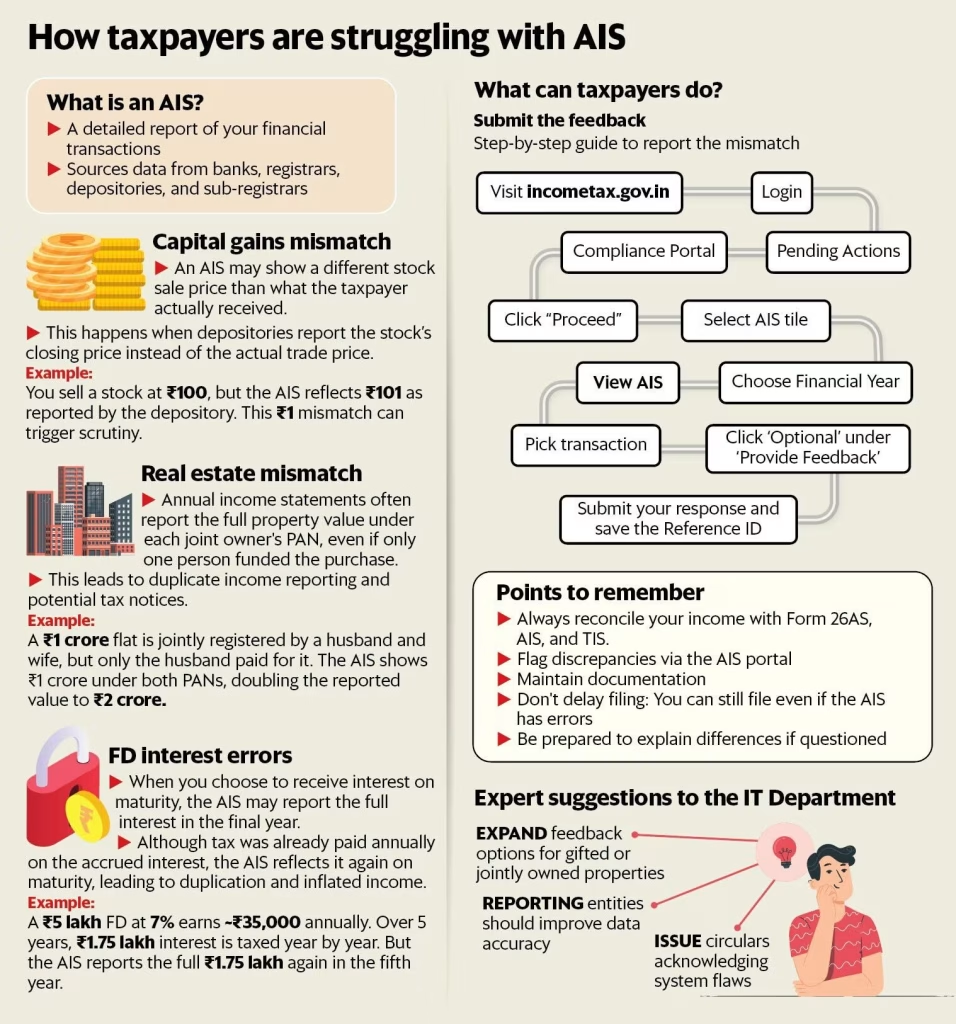


 Deduction limit of ₹ 50,000


